Every erg metre. One club record.
Log pieces, spot personal bests and keep the club moving. Row HQ syncs RowErg results both ways with each member's Concept2 Logbook, then turns the accumulated metres into a shared journey around a 3D globe.
Watch the 90-second how-to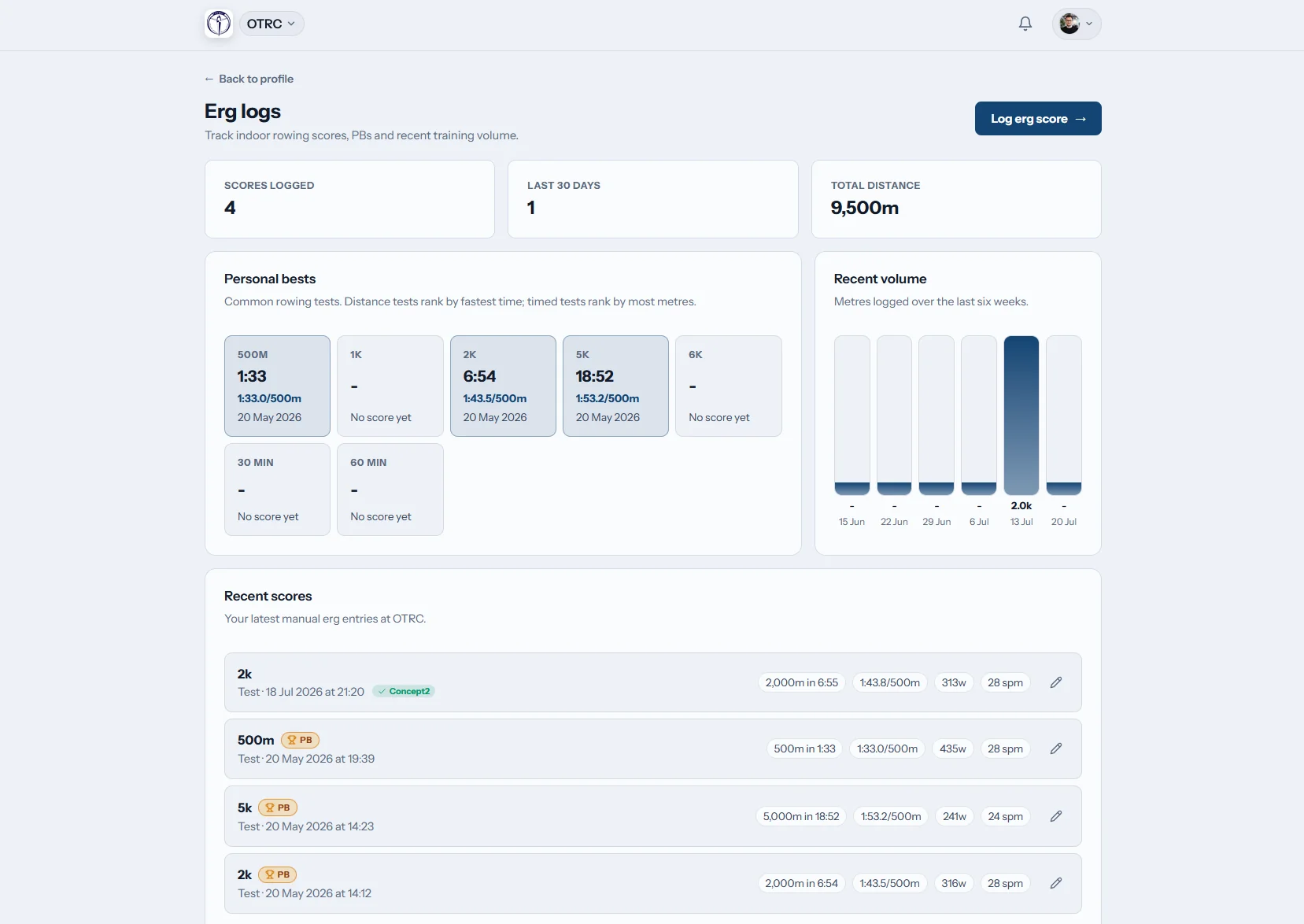
What is club erg tracking software?
Club erg tracking software gives rowers one place to record every erg workout: distance, time, splits and interval work. Row HQ calculates pace and watts, marks personal bests, shares permitted scores with coaches, and connects to each member's Concept2 Logbook. The same metres can also power a club challenge on Globe Tracker.
Erg tracking, Concept2 Logbook sync and Globe Tracker are included in every band. Check the pricing for your club size.
Watch a 2k logged and counted for the club
This 90-second how-to starts with a member logging a 2k test on her phone. Row HQ works out her split and watts and marks a new personal best. She sees where to link her Concept2 Logbook once, and the tick that sends a score to it. The admin then compares test results across members, and the globe page shows the club's progress along the Thames.
One erg score, useful across the club
Enter a piece once, keep the Logbook aligned and give the metres somewhere to go.
Log it
Record the whole piece
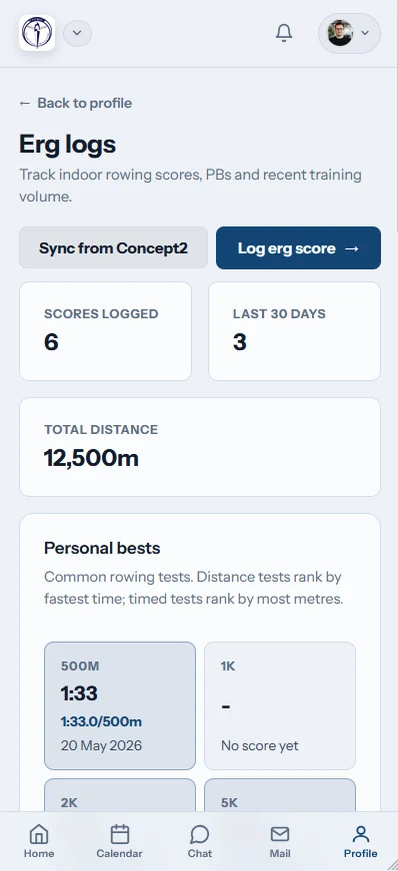
Add distance, time and splits from the member erg page. Interval workouts are supported, while split, watts, pace and time are calculated automatically. No PM5 cable or pairing is needed: type the score in, or let the Concept2 sync bring the workout across.
Erg pace always uses the worldwide rowing convention of time per 500 metres.

Sync it
Connect the Concept2 Logbook once
A member links their own Concept2 Logbook for their whole Row HQ account. The connection then works in every club they belong to.
Rows move both ways, with clear synced or error badges and matching entries claimed instead of copied.
Track it
Keep the work and the best efforts visible
Members can read their workout history and see a gold badge beside a personal best. Coaches can view member erg scores from their coach surface, with graphs for analysis of results over time.
The record stays useful after the test, instead of ending as a photo of a monitor.

Race the globe
Turn solo metres into club progress
Every logged metre moves the club boat along one active route. Admins can choose a preset journey or draw a custom route for the next challenge.
Checkpoint notices mark progress, and completed routes remain in the club history.
Stop losing the erg season in fragments
Scores become more useful when members, coaches and the Logbook read the same record.
Scattered records
- Monitor photos buried in personal camera rolls
- Club test sheets copied by hand
- Interval details flattened into one final number
- Personal records noticed only if somebody remembers
- Winter metres that never add up to a club story
Built for pieces, tests and long winter blocks
Row HQ brings individual work into the wider club record. See the rest of the product in the Oundle Town Rowing Club case study.
Complete score entry
Log distance, time and splits, including interval sessions. Pace follows the standard ergometer measure of time per 500 metres.
The maths is already done
Row HQ works out split, watts, pace and time with the same calculations available in the free rowing tools.
Genuine two-way sync
Push a new Row HQ entry to the Concept2 Logbook. Pull RowErg results back when the erg page opens, on demand or during the nightly sweep.
PBs stand out
A gold badge marks a personal best on the member's erg log. The result remains beside the rest of their recorded work.
Routes with real scale
Choose one of six presets, from the 33 km English Channel to the 46,137 km Around the World route, or let an admin create a route.
Useful coach visibility
Coaches can see member scores. Every feature on this page is also included in the free band.
Globe Tracker
Give every winter metre a destination
Globe Tracker turns separate erg pieces into one club journey. Pair it with the weekly programme in training sessions so the challenge has a clear place in the season.
Choose the journey
Select one of six preset routes or use the admin route editor.
Count every metre
Each score logged by a club member advances the shared boat.
Mark the checkpoints
In-app celebrations go to the audience chosen by an admin.
Keep the history
One route stays active, while finished journeys move into the archive.
Check the numbers before you save the piece
The public erg tools use the same rowing maths built into Row HQ. They are free to use in any browser.
Erg Pace Calculator
Convert distance and time into the average split for each 500 metres.
Calculate erg paceErg Score Calculator
Work out a finish time, distance or split from the values you know.
Check a score2K Prediction Calculator
Use recent pieces to estimate a target for the next 2K effort.
Build a 2K targetLog it while the monitor is still warm
Members can record a piece from any phone browser or the Row HQ apps. The erg log, sync state and personal best badge stay close at hand.
- Enter scores and run a manual Concept2 Logbook sync
- See synced or error badges beside the relevant entry
- Receive Globe Tracker checkpoint notifications on the phone

Connect erg work to the rest of the season
Training Sessions
Put erg blocks beside water outings in the club programme.
Coach Tools
Give coaches permitted access to member scores and session records.
Member Portal
Keep each rower's training information in one personal view.
Return to all features, see Row HQ in use at Oundle Town Rowing Club, or review the club pricing bands.
Erg tracking and Concept2 Logbook FAQs
Practical answers for British rowers, coaches and club officers.
Yes. The sync works in both directions. A Row HQ score can be sent to the member's Concept2 Logbook automatically using a tickbox that is selected by default. RowErg results in the Logbook come back when the member opens their erg page, presses Sync, or through the nightly sweep.
Only members who want Logbook sync need their own Concept2 account. Anyone can record erg scores directly in Row HQ without connecting one. A member who does connect links the Logbook once for their whole Row HQ account, so it works across every club they belong to.
Row HQ checks for a matching manually entered row when a result comes back from the Concept2 Logbook. It claims that entry rather than adding another copy. The erg list also displays synced and error badges, so the member can see the state of each transfer.
Globe Tracker is a club erg challenge shown on a 3D globe. Every metre logged by a member advances the club boat along one active route. Admins can choose from six presets or create a custom journey. Checkpoints trigger in-app notices, and finished routes remain in the history.
Yes. Erg score visibility is included in the coach surface, so coaches can review the scores available to them alongside their other coaching work. Members still keep a personal erg log, where personal best efforts are marked with a gold badge.
Yes. Erg logging, Concept2 Logbook sync, coach visibility and Globe Tracker are included in every band, including the free band. Members can use them in any phone browser and through the iOS and Android apps. Globe Tracker checkpoint notifications can also reach phones.
Make the next erg block count together
Keep each score, connect the Concept2 Logbook and move the club boat with every metre.
Free up to 20 active members, permanently. After that it is £15 a month for a 21 to 30 member club. Every feature is included on every plan and there are no transaction fees. VAT is not included. See full pricing