Know where every boat is
Book club boats, sign crews out and report damage without chasing a clipboard around the boathouse. Row HQ replaces shared spreadsheets with one live fleet record.
Watch the 90-second how-to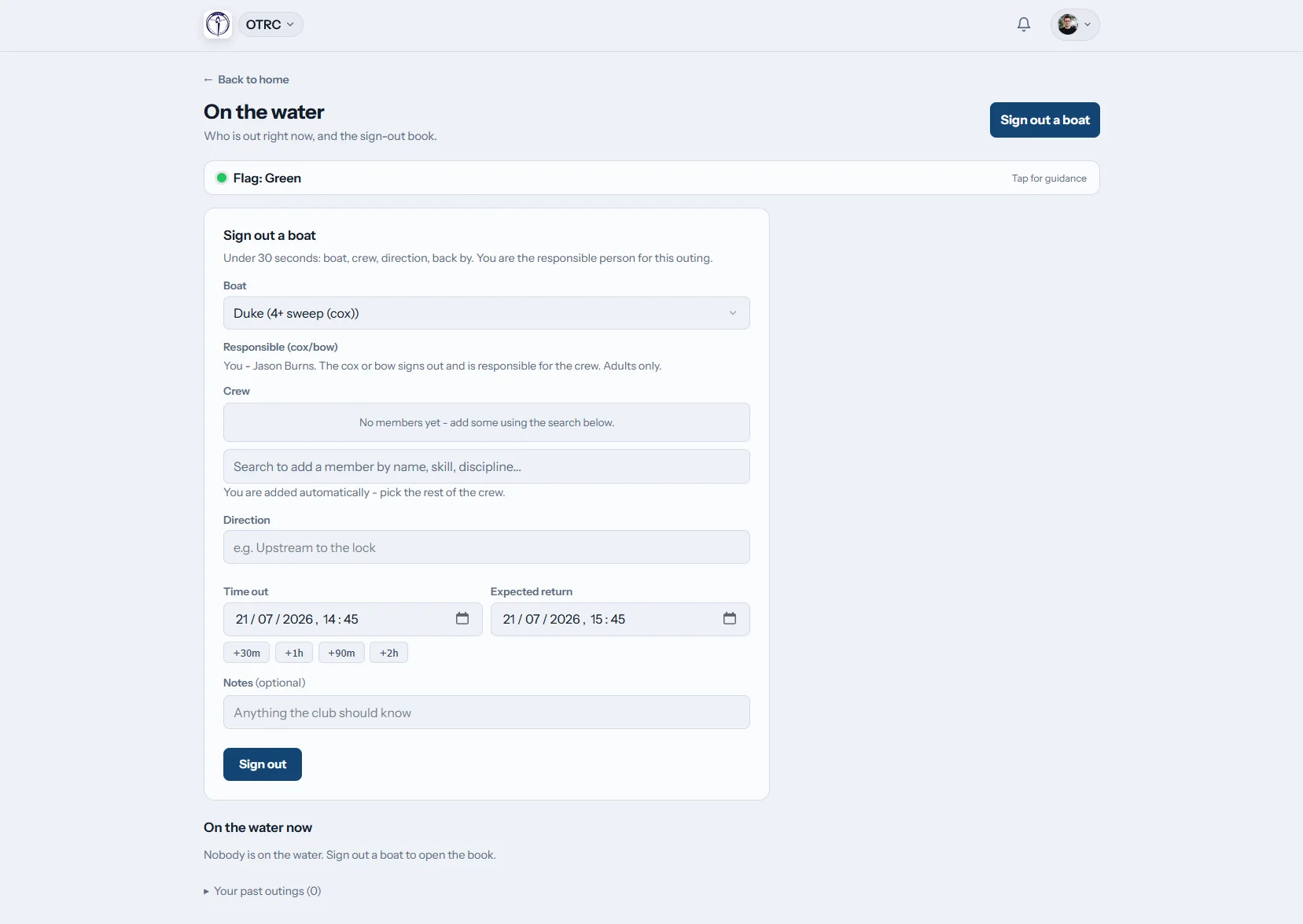

How does Row HQ boat booking work?
Members check the booking calendar, choose a boat they are cleared to use and reserve it in advance from their phone. Before an outing, they sign out the crew and expected return time. Captains and coaches watch the same shared bookings board as everyone else, while damage reports and maintenance records keep the fleet history together.
Boat booking is included in every plan. See pricing for your club size.
Watch a boat booked in 90 seconds
This how-to video starts in the fleet register and ends on the day's booking timeline. The boat captain switches member booking on, keeps session boats protected and limits booking by skill level. An intermediate sculler then books Swift for Monday morning from her phone, and only sees boats she is cleared for.
Follow a boat from rack to river
The fleet register, booking rules, outing board and equipment repair log all use the same boat record.
The fleet
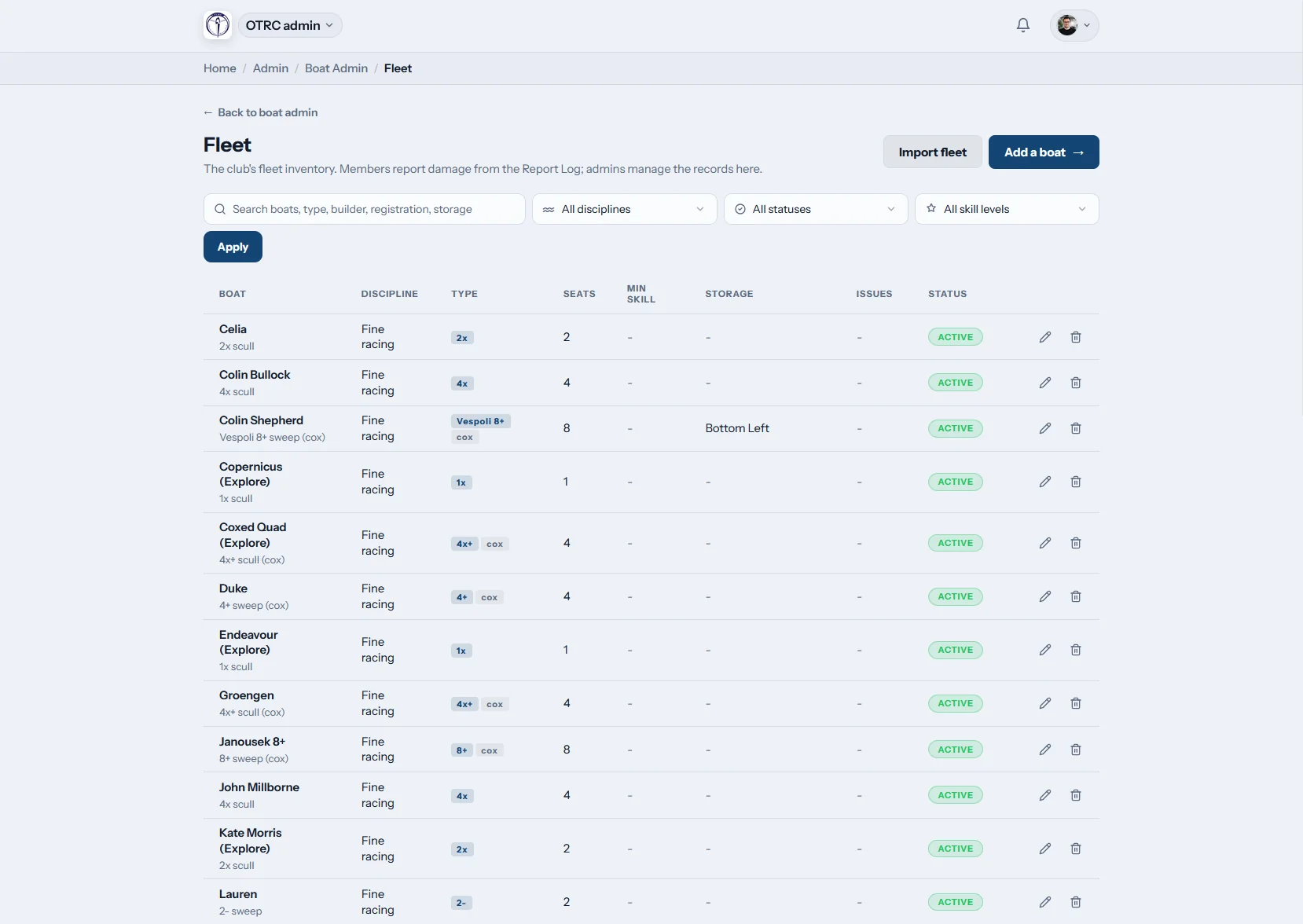
One register for the whole boathouse
Record each hull with its class, rigging, seats, cox requirement, minimum skill level and rack location. Admins can bring an existing list across with a CSV fleet import.
A winter storage move means changing the storage field, not rebuilding a separate spreadsheet.

Booking rules
The right boats reach the right rowers
Minimum skill levels stop members booking hulls they are not cleared for. Each club sets its own booking policy: switch booking on or off, and decide whether boats remain bookable during organised rowing sessions.
Private member boats stay visible only to their owner and club staff.
On the water
See every live outing
Crews sign a boat out with the names aboard and an expected return time. The live outings board shows who is afloat and records the sign-in when they return.
Overdue alerts go to the club safety contacts, alongside the current club flag.

Damage and repairs
Turn a phone report into a repair record
Members report damage from their phone and can attach photos. Admins follow each issue through the maintenance log and mark a boat unusable while work is outstanding.
The boat, report, photos and resolution stay connected in one history.
Replace the boathouse paper trail
Booking, outing and repair records work better when they describe the same fleet.
The old way
- A rack list, booking diary and fleet spreadsheet that disagree
- Members reaching the boathouse before learning a hull is unavailable
- Paper sign-out sheets with missing crews or return times
- Damage photos buried in committee messages
- Winter maintenance notes detached from the boat record
The Row HQ way
- One fleet register with rigging, skill and storage details
- Booking rules applied before a reservation is accepted
- A live board for boats currently on the water
- Overdue outings sent to named safety contacts
- Damage and repair progress held against the correct hull
Fleet tools built for rowing clubs
Manage the practical details behind every outing. See how Oundle Town Rowing Club uses Row HQ in a working club.
Booking calendar
Let members book through the member portal. Clubs can turn booking off or allow and block boats during sessions.
Skill-level rules
Set the minimum skill needed for each boat. Coaches can use the coach tools alongside those clearances.
Phone booking
Members can check availability and book before leaving home, whether they need a single after work or a crew boat at the weekend.
Maintenance log
Damage reports can include photos. Staff track repairs and mark unsafe boats unusable from the admin dashboard.
Sign-out log
Keep crew, departure and return details in one protected outing record. Read how Row HQ keeps club information safe and secure.
Private boats and launches
Where a club allows it, members can register private boats. Coaching launches sit in the same fleet for staff booking.
From singles to eights
Keep every hull class in the same register, including private boats and coaching launches. The glossary explains rowing boat types and what a rowing shell is. Coaches can then seat crews with the crew builder.
Singles
Club and private sculls for individual outings
Doubles
Paired sculling with a shared booking rule
Coxed fours
Sweep boats with seats and cox requirements
Eights
Full crews, cox details and squad access
Which boat needs which rule?
The fleet register supports different booking and clearance needs across common club hulls.
| Hull | People aboard | Typical use | Practical constraint |
|---|---|---|---|
| Single (1x) | 1 rower | Independent sculling and skills work | Minimum sculling clearance |
| Double (2x) | 2 rowers | Paired sculling and mixed experience outings | Both seats accounted for at sign-out |
| Coxless four (4-) | 4 rowers | Experienced sweep crews | Higher skill level set on the boat class |
| Coxed four (4+) | 4 rowers, 1 cox | Junior, masters and development crews | Cox included in the outing crew |
| Quad (4x) | 4 rowers | Squad sculling and head preparation | Club decides whether sessions block booking |
| Eight (8+) | 8 rowers, 1 cox | Squad training and regattas | Restricted to the required skill level |
Example boat classes and practical booking constraints. Each club sets its own rules.
Book and report from the boathouse
Rowers do not need an office computer to use the fleet record. The phone app covers the jobs that happen beside the racks and at the landing stage.
- Check availability before lifting a boat from its rack
- Report damage with photos while the details are fresh
- Read the club flag before an outing begins

Connect the fleet to the rest of the club
Training Sessions
Control whether session boats stay available for individual booking.
Events
Keep crew and equipment planning close to the event calendar.
Admin Dashboard
Manage fleet details, damage reports and repairs in one place.
Related reading
Keeping a club fleet in working order Planning better training sessions A practical guide to crew selection What is a rowing shell? Rowing boat types explained Sculling and sweep comparedNeed another detail? Read the club software FAQ, see what clubs say, or review Row HQ pricing.
Boat booking FAQs
Five practical questions from clubs moving off paper and spreadsheets.
Admins add the fleet by hand or import it from CSV. Each record can hold the boat class, rigging, number of seats, cox requirement, minimum skill level and storage location. The club then chooses whether booking is active and whether individual bookings are allowed during organised sessions.
Yes. A minimum skill level can be set on each boat class. Members only book boats that match their clearance. Private boats are available to their owner and club staff, while coaching launches can be kept for staff booking within the same fleet.
Yes. The booking calendar prevents the same boat being reserved twice for the same period. Clubs can also decide whether boats are bookable during a training session or blocked for organised use. Members see availability before travelling to the boathouse.
Members sign a boat out with the crew and expected return time. The live board shows active outings and records sign-in. If an outing becomes overdue, Row HQ alerts the club safety contacts. The club flag is also available on the phone.
A member can file a damage report from their phone and attach photos. Admins follow the issue in the maintenance log, record its resolution and mark the boat unusable when it should not be booked. The completed history remains attached to that hull.
Put your fleet on one live system
See booking, outings and repairs working together with your own club setup.
Free up to 20 active members, permanently. After that it is £15 a month for a 21 to 30 member club. Every feature is included on every plan and there are no transaction fees. VAT is not included. See full pricing