Release summary
Row HQ is now free to download for iPhone from the Apple App Store. Members enter with the Row HQ account already connected to their club. The app does not create another registration, another member list or an individual download for each shed.
The Android app arrived at the start of August. The iPhone version now puts the other half of the squad on equal footing. Members can open the club plan on the phone they already carry to the shed, while browser access remains unchanged.
Australian clubs keep one Row HQ setup across every screen. Rowers answer sessions and check crews. Coaches work from availability, publish lineups and take attendance. Committee and admin users can reach membership, fleet and payments when those areas belong to their assigned role.
What can a rower handle on iPhone?
A rower can confirm or decline a session, read the published crew, check and reserve available boats, follow club news, pay fees and entries, and record erg scores. The member portal keeps the same tasks available through a browser when a laptop or another phone is more useful.
A member can check the lineup before driving to the shed and see which boat has been assigned. Another outing can be booked from real fleet availability. News and payment records stay with the same profile. Coaches and officers see their own operational views rather than a generic member screen.
- Give the coach a clear response for the next session.
- Open the published crew and check the selected boat.
- View fleet availability and reserve a boat that is free.
- Read club notices and pay recorded fees or entry charges.
- Log an erg score and take a new profile photo on iPhone.
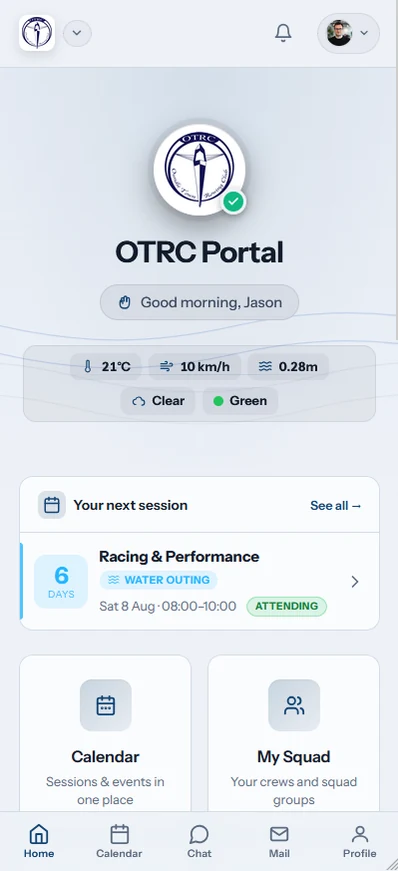
Account roles keep the screens relevant. A coach receives availability, lineup and attendance controls. Committee and admin users can open membership, fleet and payment views. A rower sees the member tools and does not gain administrative access by installing the iPhone app.
What happens to members who used Safari?
They keep everything. The iPhone app is another way into the same Row HQ club account, so the existing role, records and history are waiting after sign-in. A member can check a session in the app and later use the browser without copying or rebuilding data.
A session answer belongs to the club record, not the screen used to send it. The same applies to published lineups, reservations, notices, erg scores and payments. Committees do not need to invite iPhone members again or manage an app-only list.
- Use the familiar Row HQ account from the browser.
- Retain existing crews, bookings, notices, and financial records.
- Choose the iPhone app or web for each job.
- Keep an internet connection available because there is no offline mode.
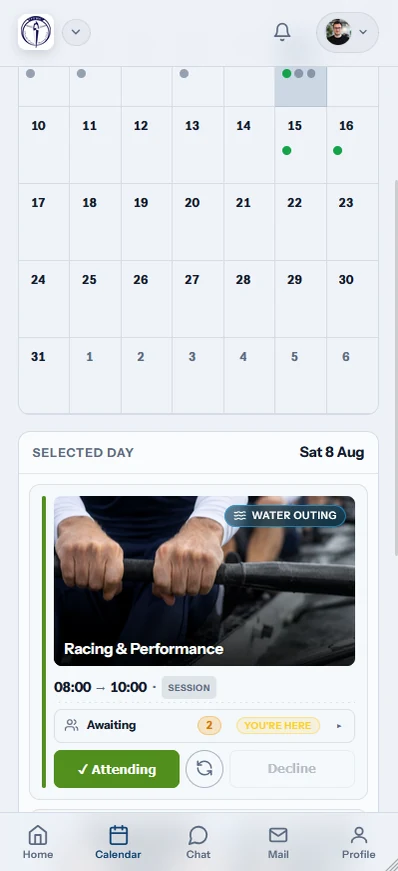
Browser access remains fully equivalent on every device. A treasurer may prefer a laptop for payments. A rower may prefer the app for a fast lineup check at the shed. Both choices return to one club account.
How do members open their account?
The iPhone app accepts Apple, Google, or an email address with password. Members select the method connected to the Row HQ account they already use. Sign in with Apple supports people who joined that way. Nobody completes a second registration or searches for a club-specific app.
Row HQ recognises the person and displays the view attached to their club role. Rowers, coaches, committee members and admins therefore enter through the same app but do not receive the same controls. The state association or club does not need to maintain another store listing.
Continue with Apple
Open the account through its existing Apple sign-in.
Continue with Google
Use the Google identity already linked to Row HQ.
Use email
Enter the usual email address and password.
Open the right view
Club permissions decide which member or admin tools appear.
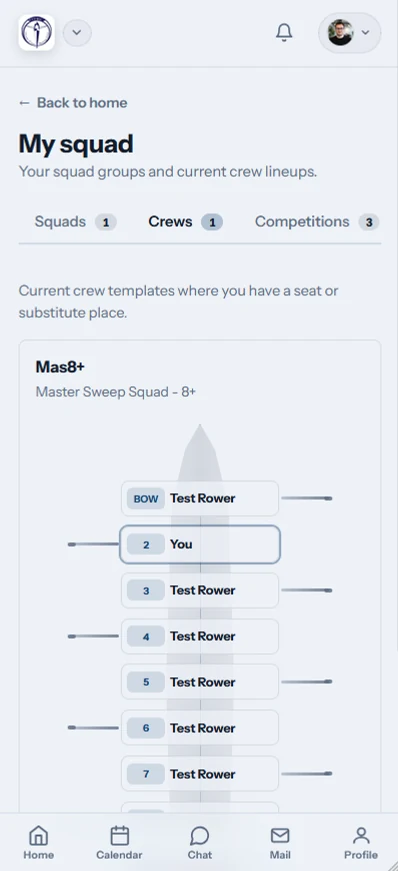
A member may also set a profile picture straight from the iPhone camera. It updates the established club profile, helping coaches and committee volunteers recognise newer rowers without creating a separate app record.
Which club actions trigger a push notification?
An iPhone alert can follow five club actions: cancelling a session, publishing news, publishing an event, sending club mail, or recording a payment for the member. The message concerns club operations already entered in Row HQ. It is not marketing from the app.
A wind change can remove a session after rowers have started planning their trip. The cancellation alert brings that decision to the phone. News, events, mail and payment entries follow the same rule: an authorised club user creates the underlying information.
- The club cancels a session that was due to run.
- A news item is published to the membership.
- An event is released through the club account.
- Club mail arrives for the member.
- A payment is entered against the member record.

The push alert is not the complete instruction. Opening Row HQ shows the item behind it. Coaches and committee users remain responsible for what the club publishes, cancels, sends or records.
What do Android and browser members use now?
They carry on with their current route. The Android app remains on Google Play, and the browser keeps every Row HQ function on any connected device. iPhone, Android and browser users share one club account and one set of records. None of the three routes works offline.
Android users can still download Row HQ through Google Play. The App Store now covers iPhone. The browser continues to suit shared computers, tablets and members who avoid installations.
That gives a club one process across different sheds, squads and phone choices. A coach publishes one lineup. Members see it through whichever connected route they choose.
How does an Australian club join?
A current member can download Row HQ free from the App Store and use the established account. A new club should set up Row HQ free, add its membership, and invite people who can then choose iPhone, Android or the browser.
The rowing club app page explains the club-wide tools. Row HQ is free for up to 20 members. Larger clubs can check the paid bands in Australian dollars on the pricing page.
Australian clubs now have store apps on both phone platforms without losing the browser. Session replies, crews, boats, fees and erg work stay in one Row HQ account. The member chooses the screen.
See you at the shed.
- The Row HQ Team