Launch details
Canadian Row HQ members can now download the iPhone app free from the Apple App Store. It opens the same club account already used through the browser. No records need moving, no second profile is created, and clubs do not publish separate apps of their own.
The Android app covered one side of the squad in early August. The iPhone release now covers the other. That matters in Canadian clubs where the short water season leaves little room for a missed lineup or an unseen session change.
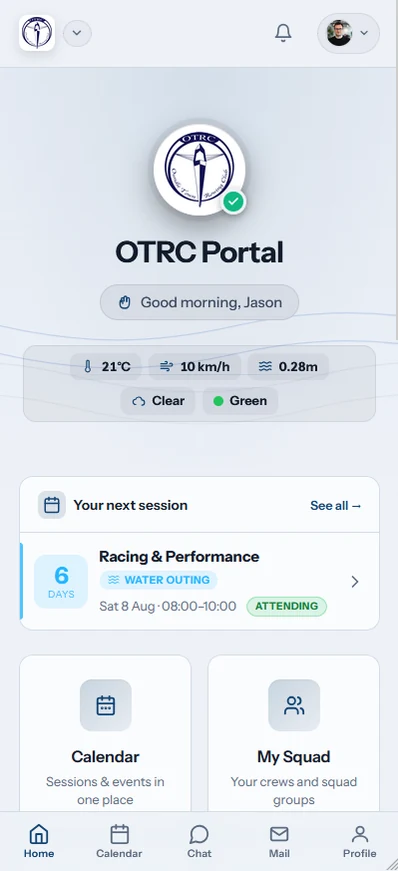
Row HQ still holds one set of club records. Rowers see their sessions, crews, boat bookings, notices, dues, and erg work. Coaches see availability, lineup, and attendance tools. Committee and admin screens provide membership, fleet, and payment access according to the role on the account.
What can a Canadian rower do in the app?
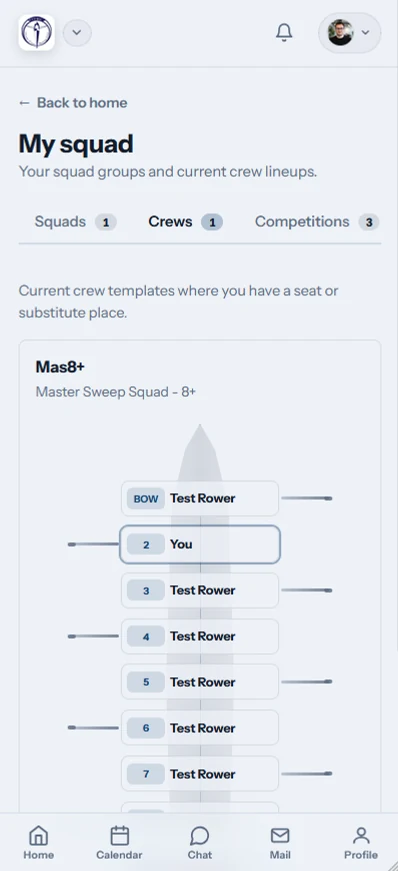
A rower can confirm or decline a session, inspect the published crew, find and reserve an available boat, read club updates, pay dues and entry fees, and log erg scores. Those functions also stay in the member portal for rowers who prefer to open Row HQ in a browser.
On the water, the lineup and shell allocation can be checked before the drive to the course. Through the indoor winter, members can keep recording erg work and reading notices. Coaches can plan from actual responses, while authorized officers see the administrative areas their position requires.
- Reply to a session and review the crew after publication.
- Look through the available fleet and reserve an open boat.
- Read current news, notices, and event information from the club.
- Pay member dues and entry fees recorded in the account.
- Log erg results and update a profile photo with the iPhone camera.
The app also supports club work beyond the member view. Coaches can build and publish lineups, then take attendance. Committee and admin users can reach membership, boats, and payments when their account permits it. Those permissions come from the club, not the device.
Do browser users need to move their information?
No information moves when a rower installs the iPhone app. Row HQ opens the established account and keeps the same role, club, and records. A member can use the app at the course, return to a laptop at home, and find the same sessions and bookings.
The browser was already connected to the main club account. A response sent there remains on the coach's availability list. A published crew or fleet reservation also appears in the app. Members do not need another invitation just because their preferred screen has changed.
- Continue with the member account already accepted by the club.
- Keep all existing sessions, crews, reservations, and payment records.
- Choose the installed app or browser for each connected task.
- Expect both routes to need internet access because neither works offline.
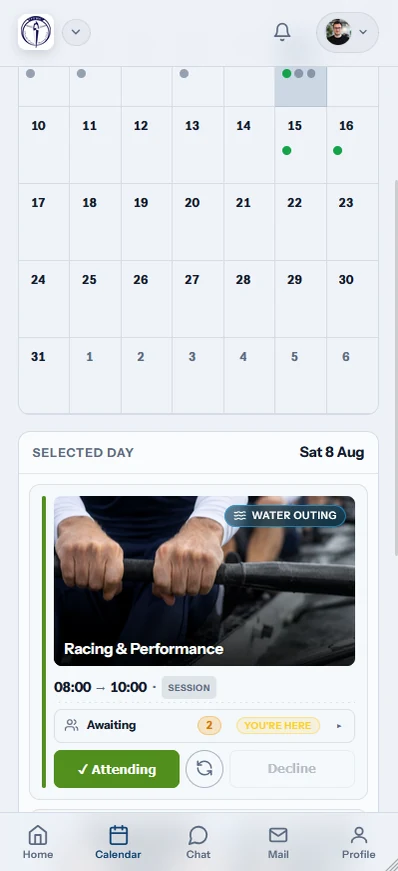
Some committee work is easier on a wide screen. Some session checks are quicker on a phone. Row HQ leaves that choice with the user and keeps the underlying information together.
Which sign-in should a member use?
Members may sign in with Apple, Google, or an email address and password. They should choose the method already connected to their Row HQ account. Sign in with Apple remains available to people who joined that way. No second registration or mobile profile is required.
There is one Row HQ app rather than an individual store listing for every provincial club. After sign-in, the member's club and permissions determine the screen. Rowers, coaches, committee members, and administrators each see the work assigned to their role.
Apple account
Use the existing Sign in with Apple connection.
Google account
Choose the Google login already attached to the profile.
Email login
Enter the current email address and password.
Existing role
Keep the club permissions already assigned to the account.
A rower can use the phone camera to add a profile picture. The image updates the same membership entry that club volunteers see elsewhere in Row HQ. It does not produce a separate identity for the app.
What notifications can a Canadian member receive?
The iPhone can alert a member after the club cancels a session, publishes news, publishes an event, sends club mail, or records a payment against the account. These messages come from day-to-day club operations. They are not promotional notifications sent by Row HQ.
A late weather decision during the water season can change travel plans. A winter event notice may concern indoor training or club business. Payment messages confirm that an authorized user entered the transaction on the member record.
- A listed session is cancelled by the club.
- New club news is published for members.
- An event is added and published through Row HQ.
- Club mail is delivered to the signed-in account.
- A payment is recorded against the rower's membership.

Each alert leads back to the club item that caused it. The committee or coach remains responsible for the cancellation, post, event, mail, or payment entry. The app simply puts that update on the member's phone.
Can the club keep Android and browser users?
Yes. The Android app stays available from Google Play, and browser access remains fully equivalent on phones, tablets, and computers. Members on every route use the same Canadian club account. They need an active connection because the apps and browser do not include an offline mode.
Android rowers can continue to get Row HQ from Google Play. iPhone rowers can use the new App Store release. Anyone else can keep a browser bookmark. The club still receives one set of responses and records.
A provincial program does not need to separate instructions by platform beyond the download link. Every member signs in to Row HQ. The coach sees one crew process across the whole squad.
How does a Canadian club get started?
Members of a current Row HQ club can install the free iPhone app and sign in normally. A new organization should create its free club setup, invite the rowers, and let each account open through iPhone, Android, or a browser.
Read the rowing club app overview for the role-based platform. Row HQ costs nothing for clubs with up to 20 members. The Canadian pricing page gives the dollar bands for larger memberships.
The iPhone launch gives Canadian squads another connected route through both the water season and indoor winter. Rowers can change screens without changing accounts. Coaches and officers keep one current club record.
See you at the club.
- The Row HQ Team