Book the right hull before push-off
See what is free, who is afloat and which boats need work without ringing around the shed. Row HQ takes fleet management out of shared spreadsheets and puts it in rowers' pockets.
Watch the 90-second how-to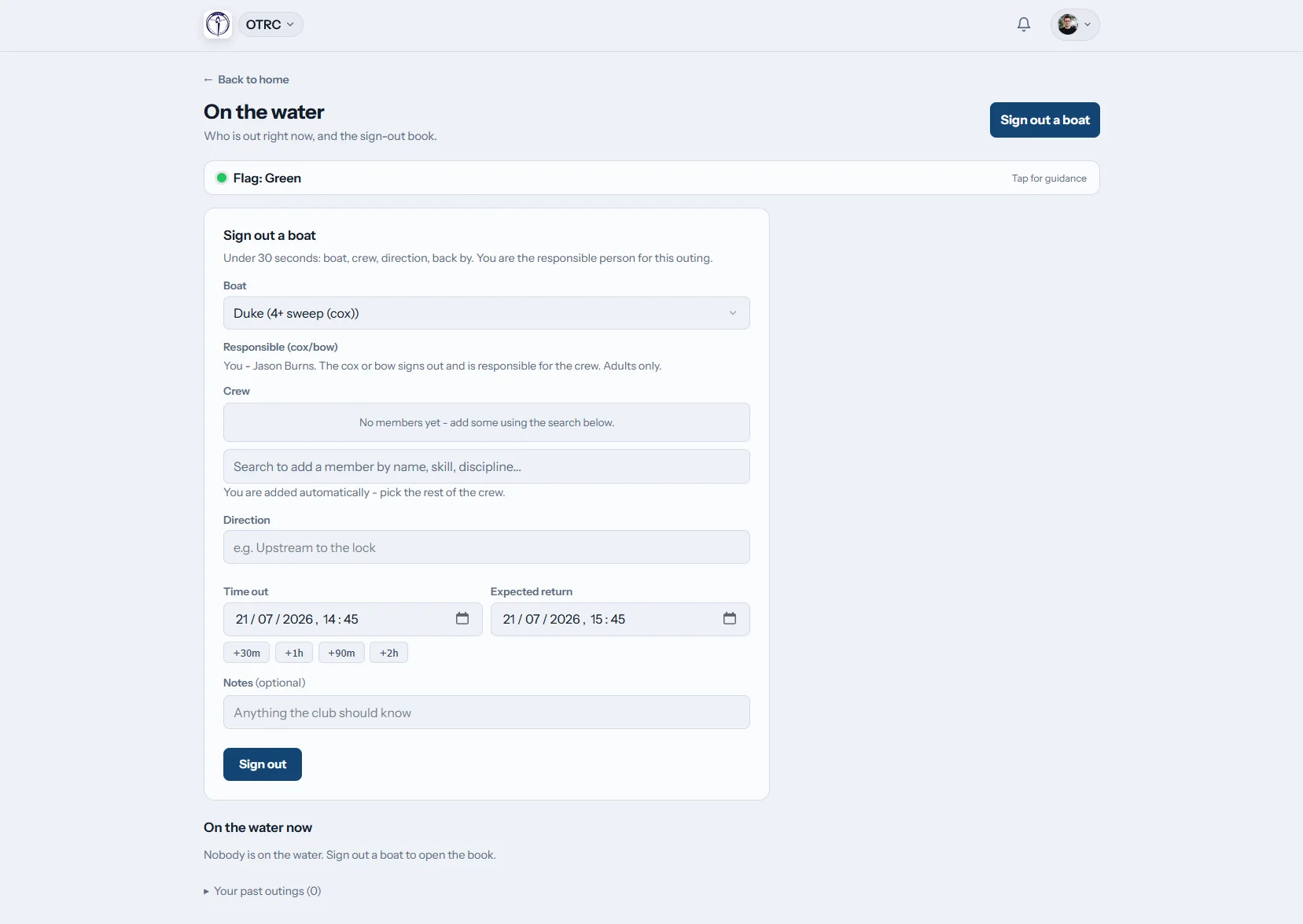

How does club boat booking work in Row HQ?
A rower checks the calendar, picks a hull cleared for their ability and books it on their phone. At the shed, the crew signs out with a due-back time. Staff see every outing on the live board, while damage photos, repair progress and return-to-use decisions remain with the boat.
Boat booking comes in every Row HQ plan. Check pricing by club size.
From boatshed register to booked boat
The video below opens on the fleet register, with every hull's skill level and rack. The captain then turns member booking on, keeps session boats blocked and restricts booking by skill. An intermediate sculler books Swift for an early row, seeing only the boats she is cleared for, and the day fills one timeline.
Run the fleet from racks to pontoon
Row HQ follows the practical sequence clubs already use, with a shared record at every stage.
The fleet
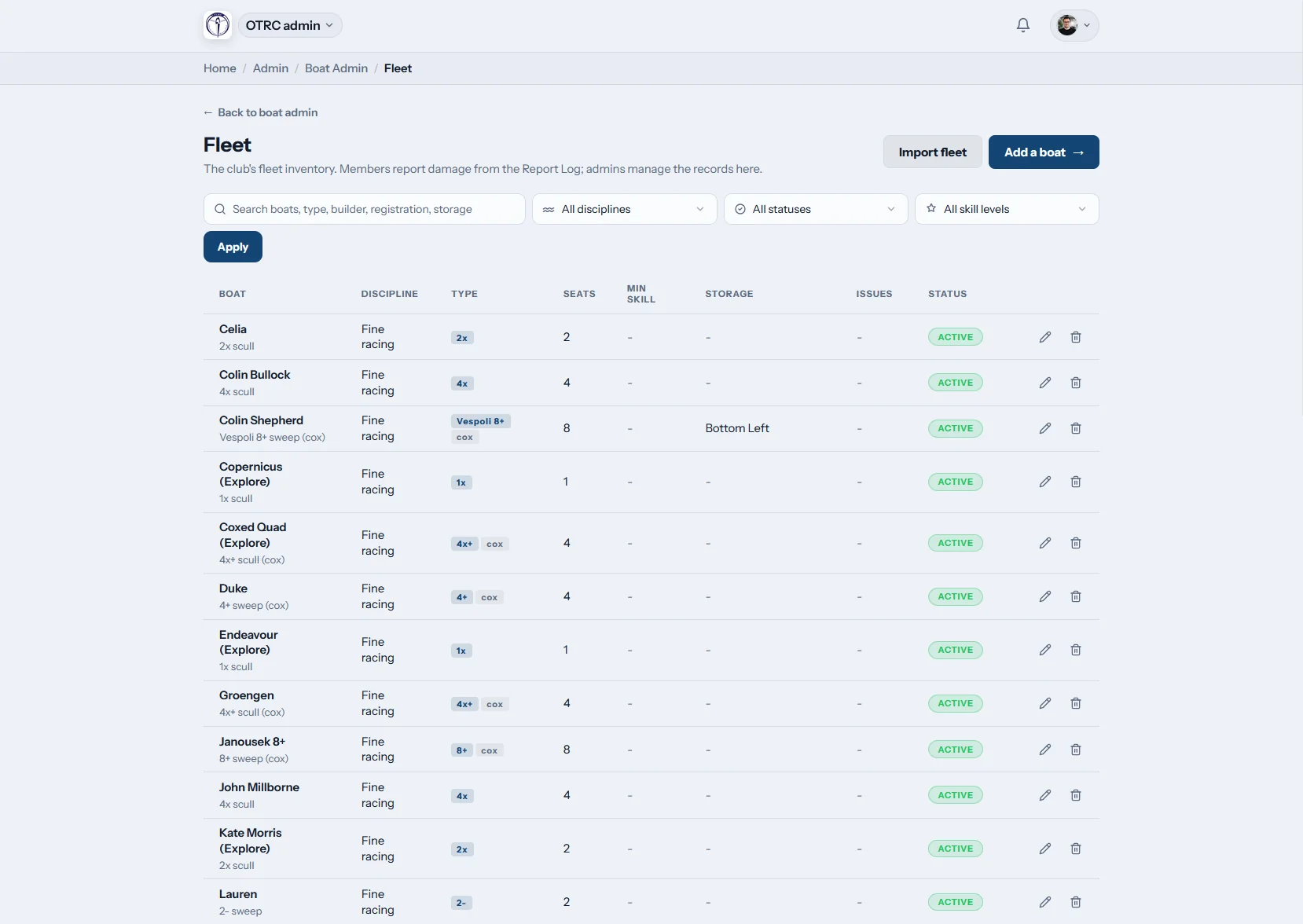
Put the whole shed on one register
List the rig, seat count, cox requirement, minimum ability and rack position for each hull. If the club already has an inventory, bring it over with a CSV import.
A Sykes single and a coaching tinny can sit in the same searchable fleet.

Booking rules
Keep top boats with cleared rowers
Minimum ability settings stop novices grabbing a racing hull. Clubs decide whether booking is available and whether session allocations block or allow separate bookings.
A members private boat stays available to that owner and the club staff.
On the water
Know who has pushed off
Crews enter the people aboard and planned return as they sign out. The live outing screen tracks every boat until it is signed back into the shed.
The safety contacts hear about overdue outings and rowers can check the club flag.

Damage and repairs
Log the knock while standing beside it
A member sends a phone report with photos when damage appears. Admins manage the repair through to completion and make the hull unavailable when it should stay off the water.
Future committees can see what failed, what was fixed and when.
Ditch the shed-door juggling act
The booking sheet, whiteboard and repair messages should never contradict one another.
Around the shed today
- A damp sign-out page beside an outdated boat spreadsheet
- Two crews arriving for one hull before sunrise
- The club flag checked only after boats leave the racks
- Gelcoat damage photographed into a busy WhatsApp thread
- Launches booked by asking whoever happens to be nearby
Inside Row HQ
- Current specifications and storage details for every boat
- Ability rules checked when the booking is made
- Crew and return information visible during the outing
- Late boats flagged to the right safety people
- Private hulls and coaching launches handled properly
The fleet jobs clubs deal with every morning
Cover bookings, safety and upkeep without adding admin at the pontoon. Oundle Town Rowing Club offers a working example from the UK.
Boat calendar
Members use the member portal to find a time. The club can switch bookings off or set how they behave around sessions.
Ability restrictions
Apply minimum skill to boat classes instead of checking each request. The coaching tools support crew decisions alongside fleet access.
Booking from anywhere
A rower can choose an available hull before leaving home, then use the same phone at the shed.
Repair tracking
Photos and maintenance updates stay with the boat. Admins mark unsafe equipment unusable through the admin dashboard.
Outing history
The sign-out and sign-in log records the crew and timings. See the controls used to keep those details safe and secure.
Private craft and launches
Clubs may let members register their own boats. Coaching launches stay in the system for bookings by staff.
Singles, crew boats and coaching launches
Give every item in the shed a proper place. The glossary covers the main rowing boat types and how a rowing shell differs. Coaches can organise seats using the visual crew builder.
Singles
Solo sculling for club and private owners
Doubles
Two scullers sharing a booking
Coxed fours
Sweep crews with a cox seat
Eights
M8+ and W8+ squad boats
Booking rules by hull class
A club can match access and session availability to the boats in its own shed.
| Hull | People aboard | Usual role | Access check |
|---|---|---|---|
| Single (1x) | 1 rower | Solo sculling and technique work | Minimum sculling level |
| Double (2x) | 2 rowers | Paired sessions across experience levels | Both scullers recorded for the outing |
| Coxless four (4-) | 4 rowers | Senior sweep training | Experienced clearance on the class |
| Coxed four (4+) | 4 rowers, 1 cox | Schools, juniors and masters rowing | Cox entered with the crew |
| Quad (4x) | 4 rowers | Squad sculling and head preparation | Session block chosen by the club |
| Eight (8+) | 8 rowers, 1 cox | State regattas and Head of the Yarra work | Required skill access |
Common boat classes and realistic controls. Each Australian club chooses its settings.
Do the job beside the racks
Booking and damage reporting belong where boats are handled. The mobile app lets rowers update the fleet before the next crew picks up the same hull.
- Choose an approved boat before arriving at the shed
- Send damage notes and photos straight from the pontoon
- Read the latest club flag before an outing

Join fleet planning to the club calendar
Training Sessions
Control boat availability while organised sessions run.
Events
Keep crews and race equipment close to the event plan.
Admin Dashboard
Manage the fleet register and outstanding repairs.
Keep reading
Look after a hard-working club fleet Sort the weekly training programme Choose crews with a clearer process Learn what makes a rowing shell Tell the main boat classes apart Compare sculling with sweep rowingIf you are still weighing it up, use the general FAQ, hear from other clubs, or open the pricing options.
Boat booking questions from Australian clubs
Straight answers for committees replacing shed sheets and group messages.
The register stores boat class, rigging, seats, cox requirement, minimum skill and rack location. Admins can load that information by CSV instead of typing an established fleet again. The club then turns booking on and chooses whether boats stay available during organised sessions.
Yes. Put the required ability on the relevant boat class and Row HQ only offers it to cleared members. A private boat is restricted to its owner and club staff. Coaching launches sit in the same register but remain available for staff booking.
It will. The same boat cannot be booked by two members for overlapping times. Clubs also control what happens during scheduled training. Equipment may remain open for personal rows or be blocked for the squad, depending on the selected setting.
It shows the signed-out boat, crew and expected return until somebody signs back in. If an outing runs late, the club safety contacts receive an alert. Rowers can check the current club flag from their phones before they take equipment onto the water.
They submit a phone report and attach photos of the problem. An admin can mark the hull unusable, follow the work in the maintenance log and close it once resolved. That gives the club a lasting repair history instead of a lost message.
Put the shed on one current system
Try the fleet register, booking calendar and live outing board with your club setup.
Free up to 20 active members, permanently. After that it is A$29 a month for a 21 to 30 member club. Every feature is included on every plan and there are no transaction fees. GST is not included. See full pricing