Quick answer
The Row HQ iPhone app is live and free on the Apple App Store. Athletes, coaches, and officers use the Row HQ account their club already gave them. Nobody needs another registration, and clubs do not need a separate branded app.
The Android release arrived in early August. Now iPhone users have the same direct route into Row HQ. A roster can include both phone platforms and people who stay on the web without forcing a coach to maintain different operating lists.
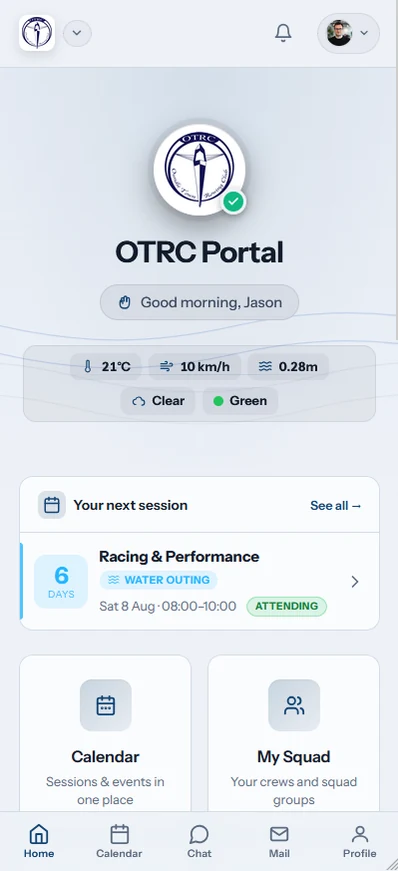
The iPhone app is another view of the club program. Athletes handle practices, lineups, boats, notices, dues, and erg logs. Coaches see availability and publish crews. Officers and admins can open membership, fleet, and payment areas when their assigned role allows it.
What can an athlete do on iPhone?
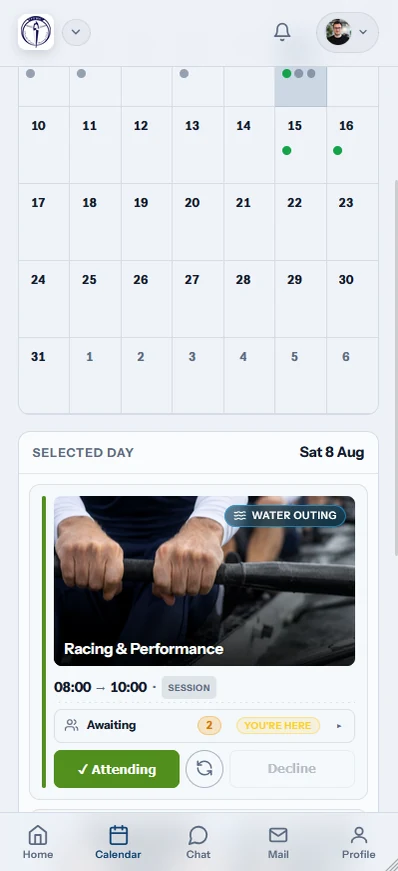
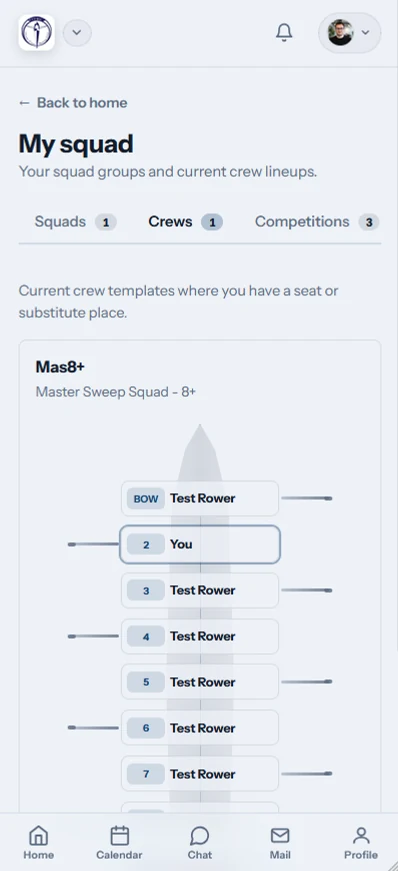
An athlete can accept or decline practice, see a published lineup, check shell availability, reserve a boat, read news, pay dues and entry fees, and record erg scores. The Row HQ member portal offers the same jobs in a browser for anyone who prefers the web.
Before practice, a clear response gives the coach usable availability. Once the crew is published, seat assignments and the selected shell are ready to check. Athletes arranging another row can inspect the fleet first. Club notices and financial records remain beside the rest of the member account.
- Answer a scheduled practice and open the released lineup.
- Check the fleet and reserve an available shell.
- Read program news, notices, and event information.
- Pay recorded dues and race entry fees through the member account.
- Save erg scores and take a profile photo with the iPhone camera.
Coaches have their own working view for availability, lineup building, publication, and attendance. Committee and admin accounts receive the membership, equipment, and payments screens tied to their permissions. A standard athlete does not gain officer access just by downloading the app.
What changes for people who used the iPhone browser?
Nothing disappears when a member installs the iPhone app. It opens the same Row HQ account used on the web, including the assigned program role and existing records. Members can answer practice in the app, use a laptop later, and move between both without transferring anything.
A browser response is already part of the main practice record. Published lineups, shell reservations, notices, and payment entries work the same way. The app does not import a copy of that information. It reads the same live club account.
- Keep the login and program invitation already in use.
- Carry the same role, history, and club records into the app.
- Switch between iPhone and a laptop without a data handoff.
- Stay connected while using either route because offline mode is not available.
The browser remains a full option, not a cut-down fallback. That gives coaches and ADs a larger screen for longer jobs while keeping phone access for quick checks. Athletes who do not want an installed app can continue exactly as they did before.
How does sign-in work on iPhone?
A member signs in with Apple, Google, or an email address and password. All three choices open the existing Row HQ account. Sign in with Apple also works for members who created their account that way. There is no second registration and no program-specific download.
The account decides what appears. Athletes receive their member view. Coaches receive practice and lineup controls. Committee and admin users see the membership, fleet, and payment tools assigned to them. The phone type does not change anyone's authority inside the program.
Sign in with Apple
Continue with the Apple login already attached to Row HQ.
Use Google
Choose the linked Google account to open the same profile.
Enter email details
Use the established email address and password.
Keep the assigned role
Athlete, coach, officer, and admin views remain separate.
Members can take a profile photo with the iPhone camera and add it to the same roster entry. The photo then appears with the established account. A second mobile profile is never created.
Which push notifications reach the phone?
The app can alert an athlete when practice is canceled, a news post or event is published, club mail arrives, or a payment is recorded against the account. Each notification comes from club activity inside Row HQ. The phone does not receive marketing through this channel.
A canceled practice alert can stop an unnecessary drive to the shell house. Event and news notifications cover material an authorized club user has published. A payment alert tells the athlete that the organization recorded money against the member account.
- The club cancels a practice on the schedule.
- An officer publishes a news post for members.
- A program event becomes available in Row HQ.
- Club mail reaches the athlete's account.
- An authorized user records a payment for the member.

The alert points back to the underlying practice, post, event, message, or payment. Coaches and officers still control what the program records. Row HQ delivers that operational update to the iPhone.
Where do Android and browser users stand?
Android users keep the app already available through Google Play. Browser users keep the fully equivalent web version on any phone or computer. All three routes open one Row HQ club account, so practices, lineups, reservations, and payments do not split by device. A connection is required because there is no offline mode.
The free Android app remains on Google Play. The iPhone app now sits beside it in the App Store. The web remains available to athletes, coaches, officers, and ADs who prefer a browser.
A program can now issue one account instruction and let each person choose the screen. Coaches still see one response list. Equipment officers still see one fleet. Treasurers still see one member record.
How does a club or program get started?
Existing members can download Row HQ free from the App Store and use their normal login. A new organization should create its free Row HQ setup, add the program, and invite athletes whose accounts will work in the apps and browser.
The rowing club app page covers the full platform. Clubs and programs use Row HQ free for up to 20 members. The US pricing page shows the paid member-count bands above 20.
Row HQ now fits the full phone mix found in a US program. Athletes can use iPhone, Android, or the web. Coaches still publish one official lineup. Shell reservations, dues, and erg records remain tied to the same account.
See you at practice.
- The Row HQ Team