Track the outing. Keep the facts with the club.
Give crews a clear sign-out, put the club water flag on every dashboard and retain reports or credentials in one account. Row HQ keeps the safety history available through winter river and coastal conditions.
Watch the 90-second how-to

How should an Irish rowing club keep its safety evidence?
The record should begin with the boat, crew, planned route and return time, then preserve what happened next. Row HQ connects that outing log with the club's chosen water flag, reports and approved member credentials. Officers can produce evidence from ordinary activity when their governing body asks, rather than recreating a winter outing later.
These safety records are available in every band. The free band suits clubs with up to twenty active members. View the active-member bands.
See one morning's safety record take shape
Across 90 seconds the club flag goes to amber with a logged reason, a single sculler signs out with her route and return time, a rigger fault is reported from the landing stage, and the safety committee reviews every outing on record and the month-by-month report trends.
Keep the full outing story together
From launch to a later committee meeting, each stage adds useful information without creating a separate safety job.
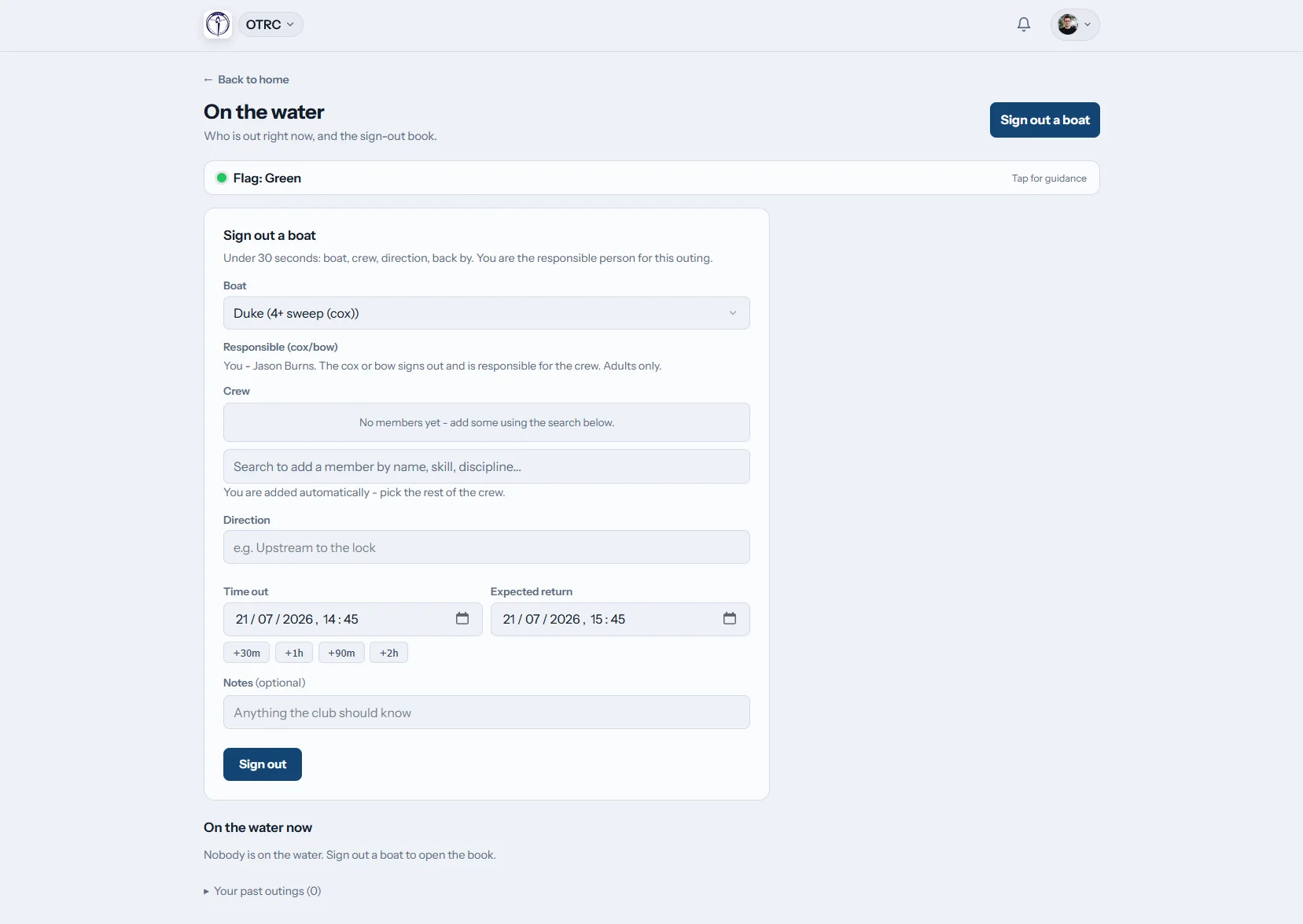
Open the outing
Record the crew before they leave
A member adds the boat, crew names, intended route and expected return. Signing in again closes the entry. When the return is overdue, safety contacts chosen by the club receive an alert.
The current-water board shows each crew yet to return.
Issue the guidance
Put one club decision everywhere
A club officer selects green, amber, red or black and the club writes each instruction. Row HQ delivers the update on dashboards, inside the app and by email.
River, coastal and weather conditions never operate the flag automatically.
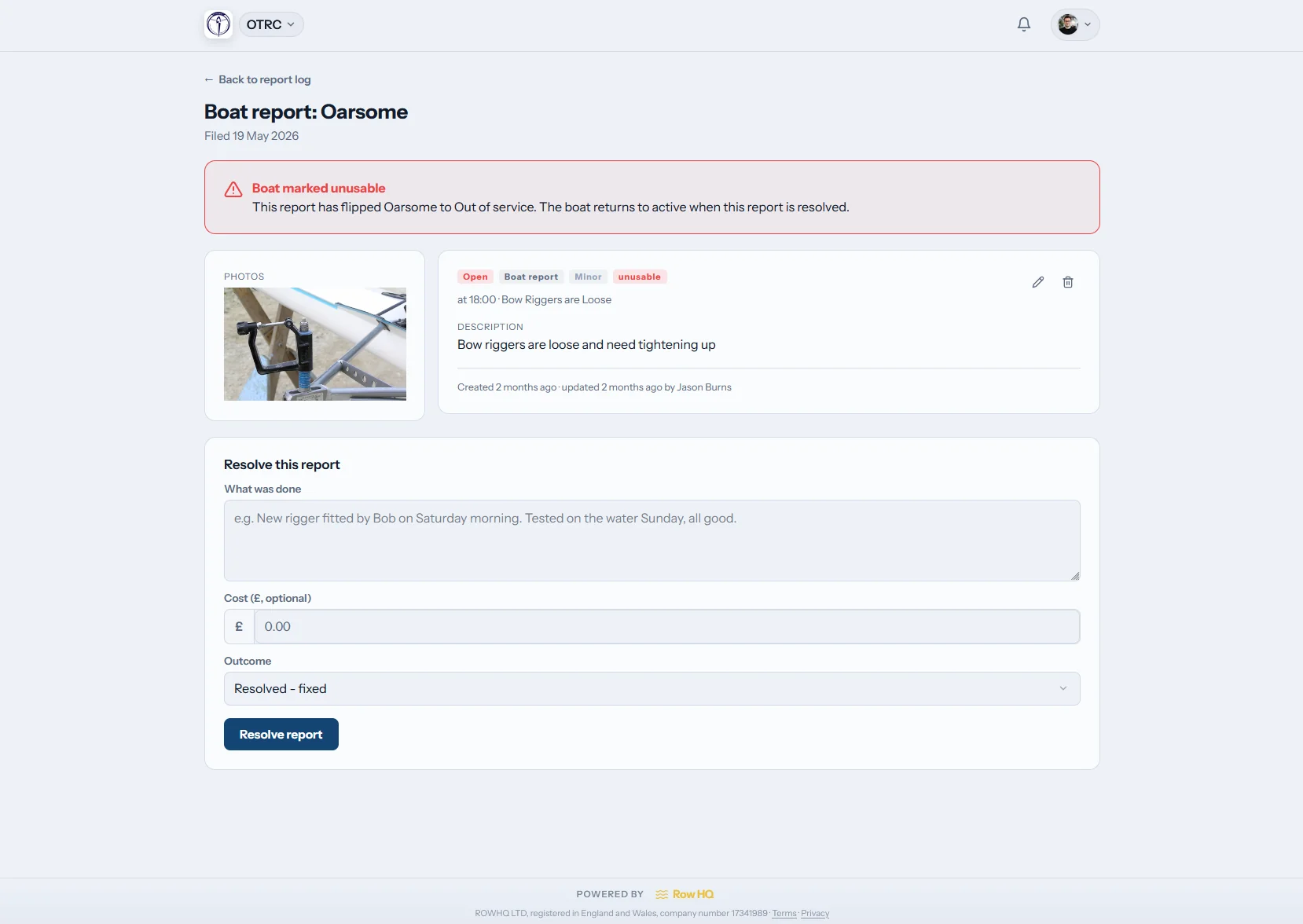
Capture the event
Keep the account and images together
One report area covers an incident and damage to a boat. Officers can attach photos, filter the list and use a dashboard tile to return to the log.
The full entry remains in the club account for follow-up.
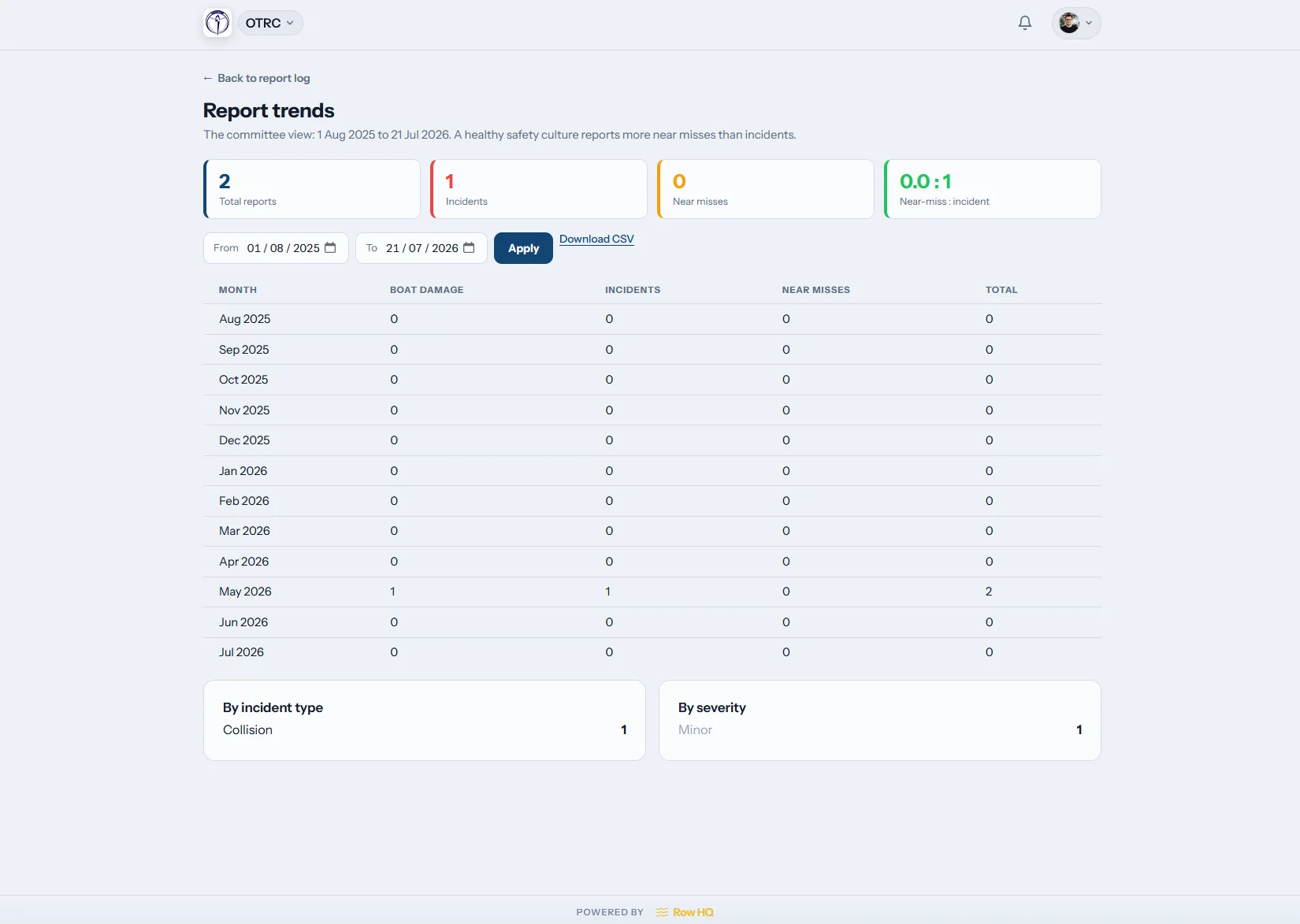
Review what repeats
Find themes across the year
The trends screen turns separate reports into a longer view. Committees can notice recurring incidents or damage around river sessions, coastal outings or winter training.
Every pattern comes from reports that remain available.
Keep evidence out of private messages
Safety information serves the club best when the next officer can still reach it.
Hard to retrieve
- A sign-out page filled in differently by each squad
- River or coastal calls forwarded between chat groups
- Incident correspondence locked in one officer's mailbox
- Credential expiry remembered near the affiliation deadline
- Committee evidence collected again for every review
Ready to review
- An active outing list with notices when crews run late
- One club-set flag sent directly to all members
- Reports, pictures, filters and historical themes together
- Evidence approval and renewal warnings attached to each member
- Safety records available from the club administration area
A clearer view for club safety officers
Clubs make the safety decisions. Row HQ distributes their guidance and preserves the records created around it.
Crew sign-out and return
List the boat, people, route and estimated return, then close the log afterwards. Place that routine beside boat booking.
Three or four flag levels
The club controls every label and guidance note. Disable black if three levels are enough. A change reaches the member portal, app notices and mandatory safety email.
Member credential records
Request proof, accept an upload after admin review and set an expiry date. Country and governing-body types can gate relevant activities. Use the affiliation-audit export to collect the entries.
Weather at the club
Show current conditions for the club location if helpful. The safety officer still reads local river, tide, coastal and wind information and personally selects the club flag.
Incident and equipment log
Save reports and photos under one history, narrow results with filters and look for trends. An admin tile keeps access visible.
Declarations and emergency contact
Profiles carry swim and tread-water declarations with at least one emergency contact. The service deliberately avoids medical or health data.
Turn club routine into review material
See how Oundle Town Rowing Club uses Row HQ to manage real club work and retain its records.
Define club practice
Enter flag text, safety contacts, visible conditions and credential options.
Log boats going out
Members record the crew, course and expected return before departure.
Keep follow-up visible
Surface overdue outings, outstanding reports and approaching credential lapses.
Use the club history
Bring reports, patterns and exported credential evidence to a review.
Take the club record to the slip
Row HQ opens in any phone browser and has iOS and Android apps. Push notifications reach members with flag changes or overdue-outing notices. Officers can also view the report log close to where an issue occurred.
- Read the latest river or coastal guidance set by the club
- Receive immediate phone notices when the status changes
- Add photographic evidence before leaving the waterfront

Keep safety linked to club operations
Boat Booking
Keep equipment allocation close to the crew log.
Member Portal
Show each rower the club status and their credential requests.
Admin Dashboard
Give office holders a home for reports and settings.
Free tools for safety paperwork
Make a rowing risk assessment Open the risk assessment template Open the incident report templateCompare all Row HQ features, read the club bands, or visit the Oundle Town Rowing Club case study.
Irish rowing club safety FAQs
Practical details for safety officers looking after river and coastal club records.
No. Row HQ carries no governing-body endorsement, does not submit the club's review and cannot promise a pass. It retains the outing, incident, damage and credential records created as members use it. Officers can use that history when gathering the evidence requested by their governing body.
No. Current local weather may appear on the dashboard, but a person at the club selects the flag. The club writes its own guidance for green, amber, red and black. Black can be switched off. No data source makes the safety decision.
The chosen status and club wording appear on every member dashboard. An in-app notification and email are also sent to each member, and safety emails cannot be disabled. The flag shares guidance only. It does not prevent a boat from being signed out.
The sign-out record includes an expected return alongside the boat, crew and route. It stays on the live water board until closed. If the planned time passes, Row HQ sends an alert to the club's nominated safety contacts. Signing back in completes the entry.
Row HQ warns before the recorded expiry date. The full workflow begins with an admin request, followed by the member's evidence upload and an approval. The club may use approved credentials to gate specified activities. An affiliation-audit export gathers the credential information.
No. Medical and health details are not collected. Row HQ keeps only swim and tread-water declarations for this purpose, along with at least one emergency contact on every member profile. This is an intentional limit on the information held.
Make the next outing easy to account for
Keep the live picture clear and preserve the evidence your next committee will need.
Free up to 20 active members, permanently. After that it is €18 a month for a 21 to 30 member club. Every feature is included on every plan and there are no transaction fees. VAT is not included. See full pricing