Run the boathouse without the booking diary
Let members find a boat, record the crew and report a fault before another outing starts. Row HQ gives the committee one current fleet view instead of spreadsheets and notes on the shelf.
Watch the 90-second how-to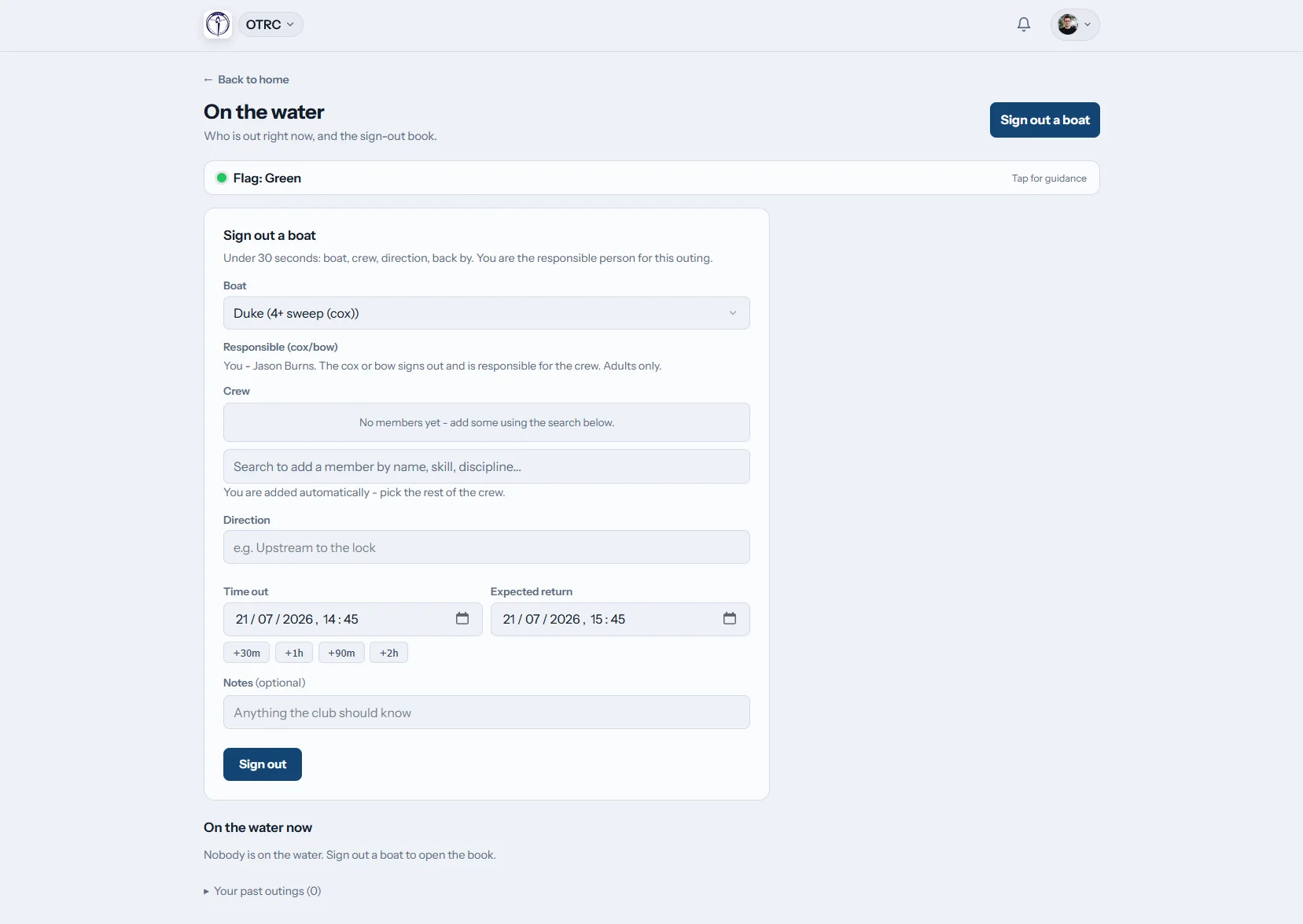

How does Row HQ organise boat booking?
Members view the club calendar, choose a boat within their skill clearance and make a booking. At launch, they enter the crew and expected return. Committee and safety officers follow current outings on a live board, while damage reports, photographs and repair decisions build a lasting record for each hull.
The fleet and booking system is included throughout Row HQ. See the plans for your club.
See a member book the right boat
This 90-second video walks through the fleet register, the booking rules and a booking itself. Booking is switched on, boats used by club sessions stay blocked, and skill levels decide what each member can take out. One intermediate sculler books Swift for an early outing, then the whole day appears on one timeline.
Follow the hull from boathouse to slip and back
The booking, outing and maintenance details stay joined even when different volunteers handle them.
The fleet
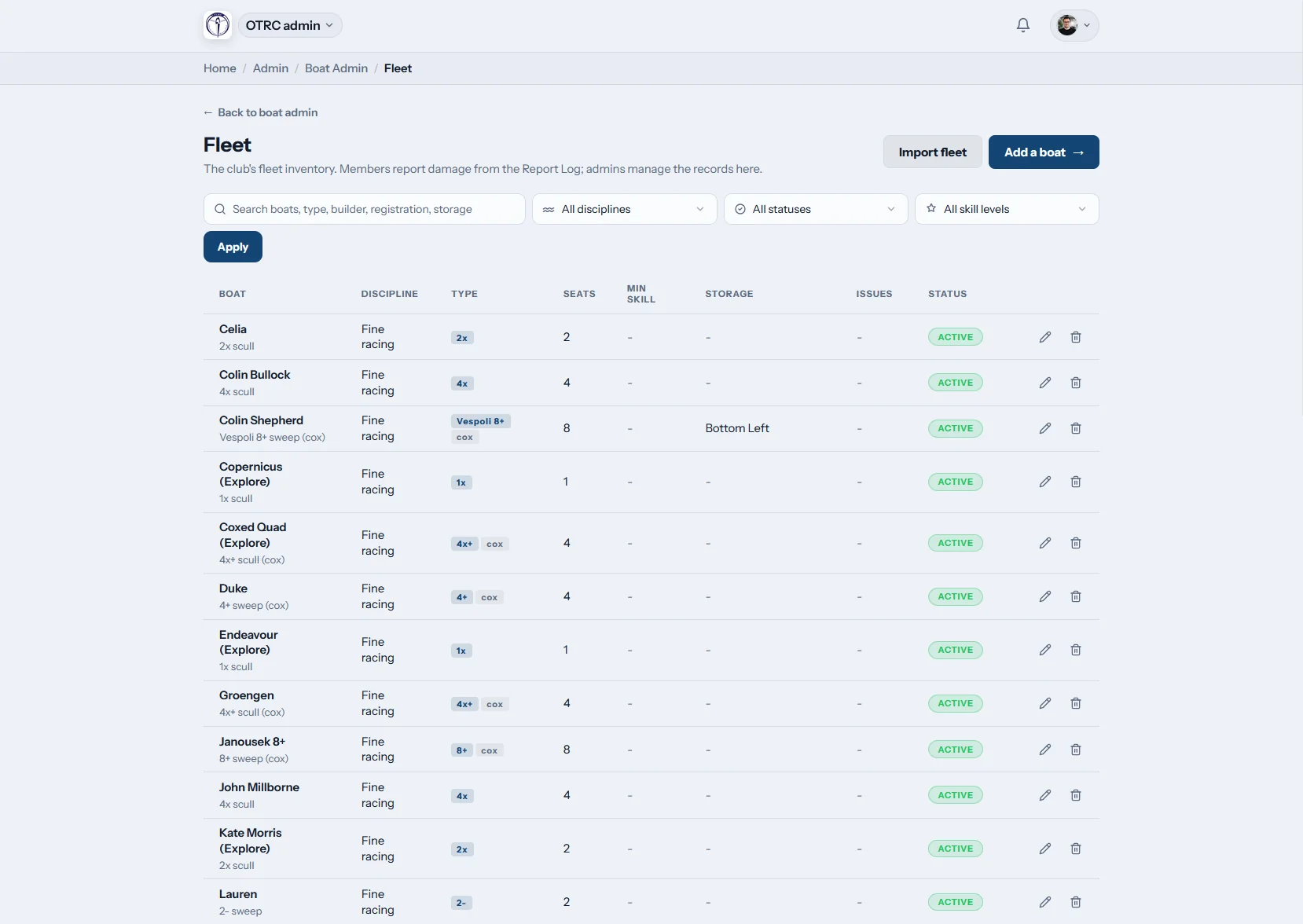
Catalogue what the club actually owns
Give each boat its rig, seats, cox requirement, minimum skill and place in the boathouse. A club with an existing list can transfer it by CSV.
Committee handovers no longer depend on somebody finding last year's equipment file.

Booking rules
Protect boats without slowing members down
Class clearances keep new rowers away from advanced equipment. The committee chooses when booking is enabled and whether training sessions reserve hulls or leave them free.
A privately owned boat remains bookable only by its owner and club staff.
On the water
Keep sight of outings after they leave the slip
Members sign out the boat with the full crew and due-back time. The live screen shows every active trip and clears it when the boat is signed home.
An overdue crew triggers the club's chosen safety contacts.

Damage and repairs
Give the next committee a proper history
A rower reports damage by phone and includes pictures. Admins take an unsafe boat out of use, follow the repair and note when the issue is resolved.
The full maintenance trail stays beside the hull rather than inside a message thread.
Retire the diary on the boathouse shelf
A club needs one answer about availability, safety and repairs, not three half-finished records.
The committee patchwork
- A paper diary that differs from the fleet spreadsheet
- Two crews meeting at the slip for the same boat
- A safety officer guessing who is late back
- Damage photographs lost among club messages
- Private boats mistaken for general club equipment
The Row HQ record
- Boat class, rigging and storage information kept current
- Member access decided by minimum skill
- Crews and return times visible while they are afloat
- Overdue warnings sent to named safety volunteers
- Maintenance and ownership recorded against each hull
Practical fleet tools for volunteer committees
Spend less time matching diaries to repair messages. The Oundle Town Rowing Club case study shows the workflow in another working club.
Shared booking calendar
Members choose available hulls from the member portal. Committees decide whether booking runs and how club sessions affect access.
Minimum skill controls
Match classes to the rowers allowed to use them. The coach tools keep crew work close to those decisions.
Booking on the go
A member sees current availability from home, work or the clubhouse instead of phoning the captain.
Maintenance follow-through
Attach photos, keep open work visible and mark a hull unusable through the admin dashboard.
Outing sign-out
Names and timings stay in the water log for safety and reference. Learn how these records are handled on the security page.
Personal boats and launches
Where club rules permit, owners add their own hulls. Staff can also reserve the coaching launches held in the fleet.
Keep every class in the club register
Cover sculling boats, sweep crews, member-owned hulls and coaching launches. Read the glossary guides to rowing boat types and rowing shells, then use the crew builder for seat planning.
Singles
Individual club sculls and private boats
Doubles
Two-person sculling outings
Coxed fours
Junior, senior and masters sweep crews
Eights
Large crews preparing for heads and regattas
Choose controls that fit each class
Different crew sizes and training uses need different access decisions.
| Hull | People afloat | Club use | Suggested control |
|---|---|---|---|
| Single (1x) | 1 rower | Independent sculling and skill development | Minimum sculling standard |
| Double (2x) | 2 rowers | Paired rows and mixed experience work | Both names included at sign-out |
| Coxless four (4-) | 4 rowers | Experienced sweep crews | Higher clearance applied |
| Coxed four (4+) | 4 rowers, 1 cox | Junior and masters outings | Cox recorded with the crew |
| Quad (4x) | 4 rowers | Club sculling and head training | Session access chosen by the committee |
| Eight (8+) | 8 rowers, 1 cox | Championship and squad preparation | Suitable skill class only |
Example hull classes and booking considerations. The club sets the final rules.
Record the detail down at the slip
Members can do the essential fleet jobs without going back into the clubhouse. Their update reaches the committee and the next crew straight away.
- Check for a free, suitable boat before leaving home
- Send a damage report with clear photographs
- Consult the club flag before taking to the river

Bring boats into the rest of the club plan
Training Sessions
Decide whether training allocations close boats to other bookings.
Events
Keep regatta and head planning beside crew information.
Admin Dashboard
Work through fleet changes and unresolved damage reports.
Related club guides
Keep the club fleet in sound condition Organise a busy training week Make crew selection more transparent Find out what defines a rowing shell Read about the main rowing boat classes Understand sculling and sweep rowingYou can also read the full FAQ, see what other clubs report, or look through the pricing choices.
Boat booking questions from Irish clubs
The details committees want before replacing the paper diary.
Add boats individually or import an existing list by CSV. Each record includes its class, rigging, seats, cox requirement, minimum skill and boathouse position. The committee then enables booking and chooses what should happen to availability during formal training sessions.
Yes. Set the required skill on the boat class and members only receive choices matching their clearance. A private boat is shown to its owner and club staff. Coaching launches can be included too, with access kept for authorised staff bookings.
Yes. Overlapping reservations for the same hull are refused. Clubs also set whether a scheduled session blocks equipment from separate use or leaves it bookable. The live calendar gives members the answer before they make the journey to the boathouse.
The crew and expected return are entered when the boat signs out. Current outings remain on the live board until they sign in. Row HQ sends overdue alerts to the selected safety contacts, and members can check the club's current flag on mobile.
The member files a phone report and may include photographs. An administrator marks the boat unusable if needed, monitors the repair and records its completion. Those details remain with the hull, giving future committees a dependable maintenance history.
Give the committee one dependable fleet record
Try the booking, sign-out and repair workflow with boats from your own club.
Free up to 20 active members, permanently. After that it is €18 a month for a 21 to 30 member club. Every feature is included on every plan and there are no transaction fees. VAT is not included. See full pricing