See every crew. Keep every safety record.
Give safety officers a live view of boats on the water, a club-set conditions flag, and one place for reports and credentials. The board gets a usable record without chasing separate files.
Watch the 90-second how-to

What should rowing program safety software record?
A useful system records the shell, lineup, planned route and return time before practice. It then keeps the actual return, water-status notices, incident or damage reports, and approved safety credentials. Row HQ creates that history through normal use, giving safety officers and the board evidence to review when their governing body asks for it.
Programs receive the complete safety toolset in every band. The free band supports up to twenty active members. Compare bands by active roster size.
Watch a practice safety record built in 90 seconds
This how-to video follows one morning: the water status goes to amber with a logged reason, an athlete signs a single out with her route and return time, a loose rigger is reported from her phone, and the program reviews every outing on record and the monthly report trends.
Follow the safety record through practice
Each action leaves the next person with clear information about the crew, conditions, or report.
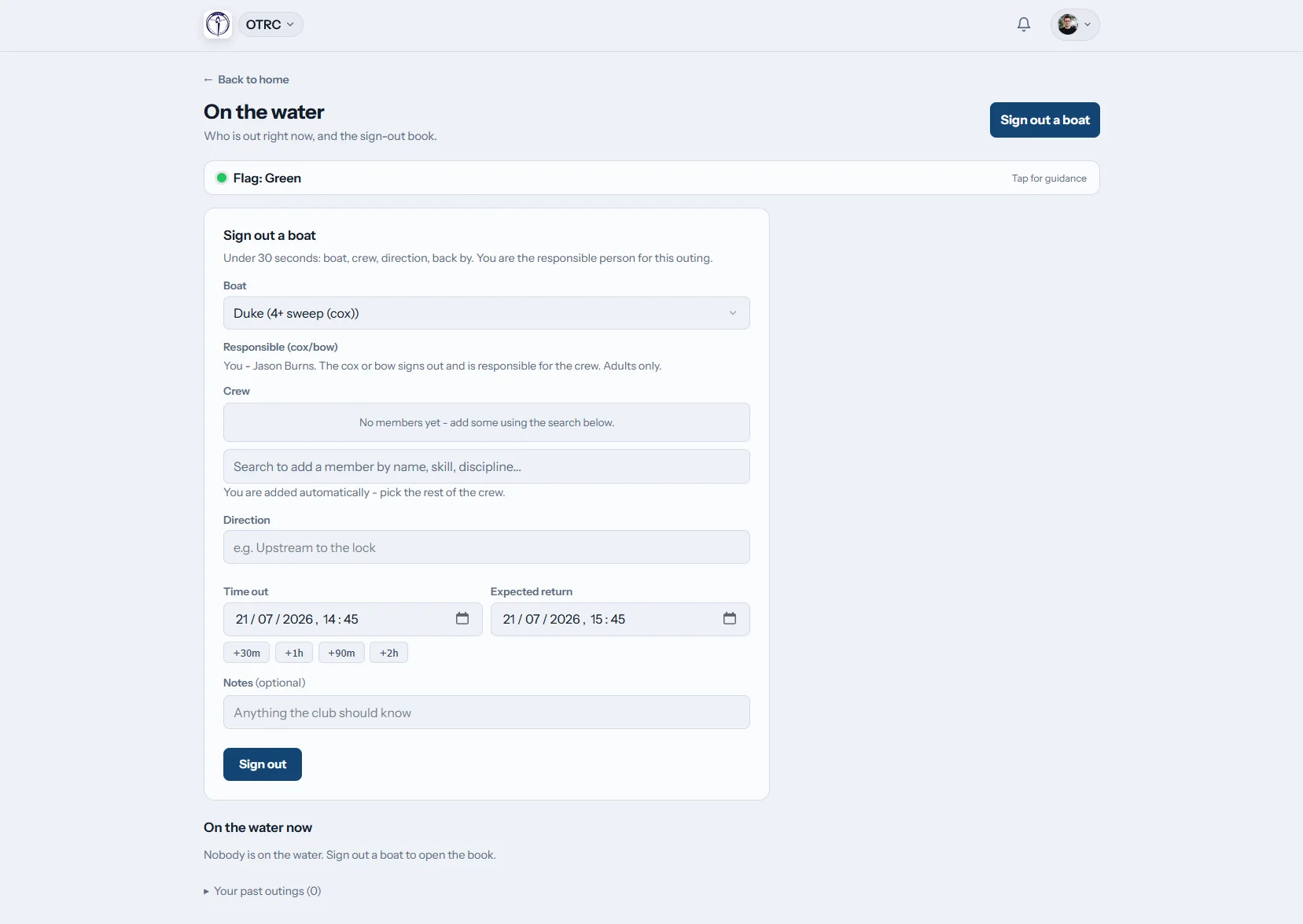
Check out
Name the shell and lineup
Before launching, a member enters the shell, crew, route, and planned return. The same outing is checked back in at the dock. Late crews trigger notices to program safety contacts.
The active-outings board answers who is on the water now.
Post status
Share the decision made at the boathouse
Someone at the program selects green, amber, red, or black. Members receive the change inside Row HQ and by email. Each program supplies the wording for all enabled levels.
Conditions data never changes the flag on its own.
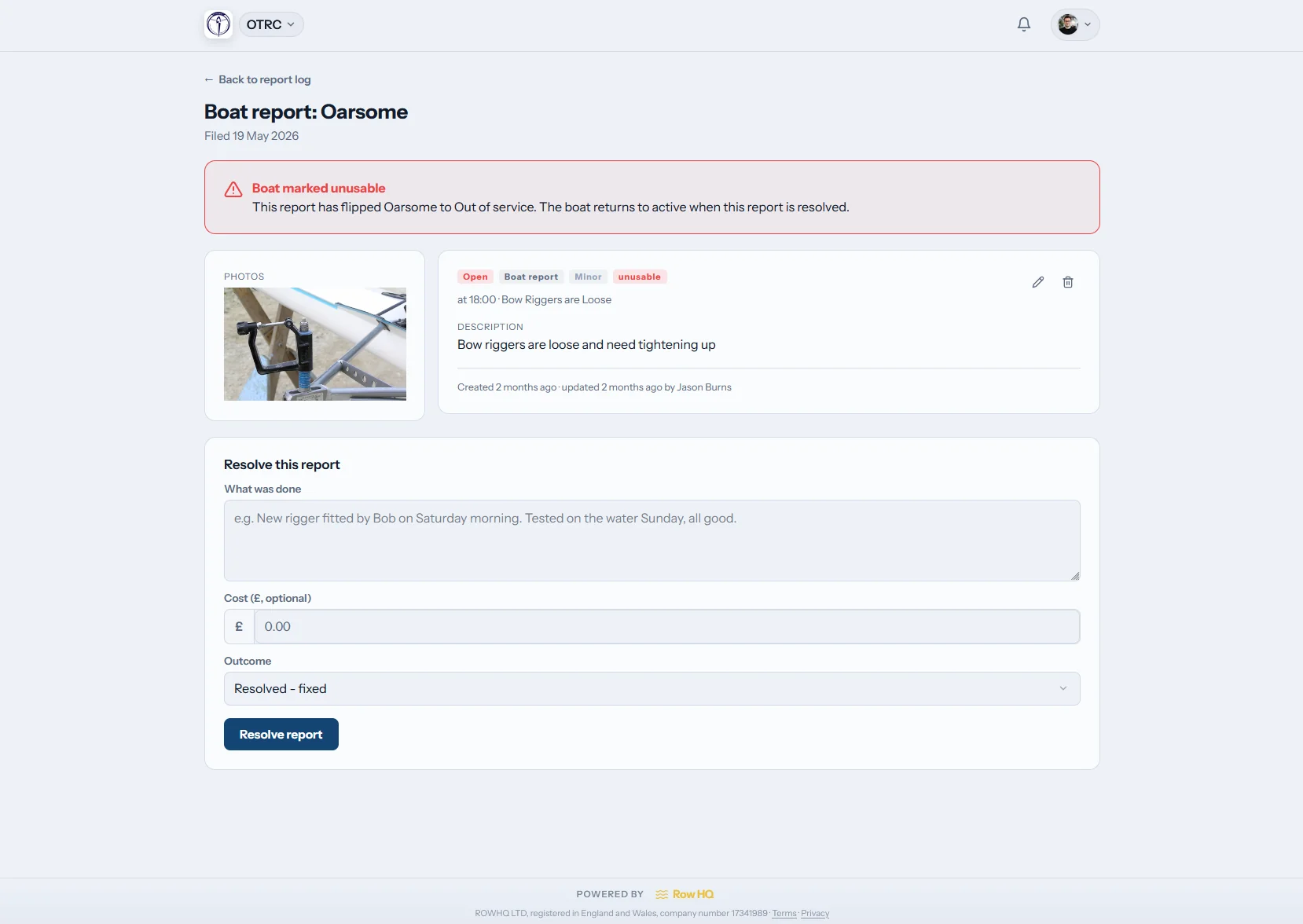
File a report
Keep the facts with the issue
One log accepts both incident and shell-damage reports. Upload photos, filter past entries, and use the dashboard tile to return to the report history.
The record remains available after the message thread moves on.
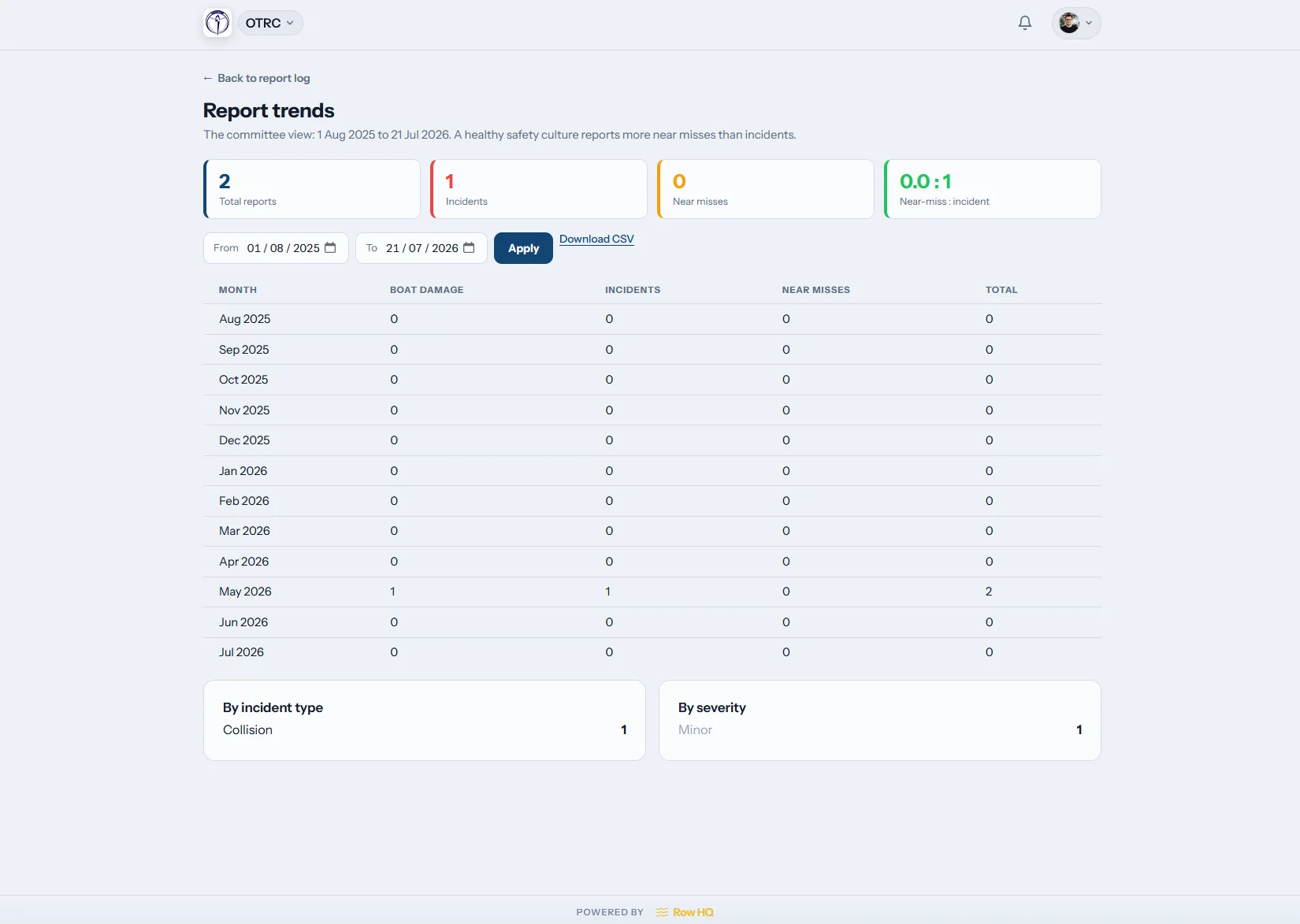
Review trends
Find repeated problems
A trends screen shows how reports develop over time. Officers can spot recurring damage or incident themes before the next board review.
Patterns sit beside the underlying report history.
Move the safety record out of scattered tools
The program should not have to reconstruct an outing months after it happened.
Separate records
- A clipboard checkout sheet with missing return marks
- Status updates lost among group messages
- Damage photos living on personal phones
- Credential dates maintained in an isolated file
- Board members asking several people for the same evidence
Connected records
- Current crews and late-return notices in one live view
- A person-set flag delivered to every member
- Searchable reports with images and long-term patterns
- Member evidence, approvals, and renewal reminders together
- Review material available through the program admin area
Practical controls for a rowing program
The people running practice choose the settings. Row HQ records their decisions and the activity around them.
Shell checkout and return
Log the shell, lineup, route, and due-back time before launch. Close the outing at the dock. Pair the workflow with shell reservations.
Program-set conditions flag
Use three or four levels with program-written labels. The chosen guidance appears in the athlete portal, plus mandatory safety email and in-app notices.
Safety credential workflow
Ask for a credential, receive uploaded proof, approve it, and watch its renewal date. Seeded country and governing-body types can control access to selected activities. An affiliation-audit export collects the entries.
Local weather panel
Place current weather for the program location on the dashboard. The program decides if the panel appears and uses it as information, not as an automatic status decision.
Damage and incident history
Attach photos to either report type, filter the log, and examine trends. A tile keeps the log visible in the admin dashboard.
Member readiness details
Record swim and tread-water declarations on each profile, with at least one emergency contact. The platform intentionally excludes medical and health information.
Make the record part of practice
See a working club example from Oundle Town Rowing Club, where Row HQ supports ordinary club operations.
Configure program choices
Set safety contacts, flag text, dashboard conditions, and credential categories.
Log launch details
Crews enter their shell, route, lineup, and planned return.
Respond to exceptions
Late outings, unresolved reports, and upcoming expirations become visible.
Prepare for review
Bring together the history, patterns, and affiliation-audit export for the board.
Carry safety information to the dock
Open Row HQ from any mobile browser or use its iOS and Android apps. Push notifications put status changes and outing alerts on phones, while mobile reporting keeps the log close to the boats.
- Check the program status and written guidance before practice
- Get push notices when the flag changes or an outing runs late
- Photograph damage and begin a report near the shell

Link safety with daily program work
Boat Booking
Keep shell availability near the checkout record.
Member Portal
Show athletes their status notice, profile details, and credentials.
Admin Dashboard
Give officers one view of reports and program settings.
Free planning materials
Build a rowing risk assessment Download the risk assessment template Download the incident report templateReview the full feature list, choose a roster band, or visit the Oundle Town Rowing Club story.
Rowing program safety record questions
Details safety officers and boards often need before adopting a shared system.
No. Row HQ does not have governing-body endorsement and cannot promise any review result. It stores the outing, report, damage, and credential evidence produced during normal program work. Officers can use that material when preparing for the record checks their governing body asks about.
No. The weather panel provides current local information only. Someone at the program chooses the flag level. The program writes the labels and instructions for green, amber, red, and black, or disables black for a three-level system. Row HQ never makes the launch decision.
Every member sees the selected level and program guidance on their dashboard. Row HQ also sends the update inside the app and by email. Members cannot opt out of safety emails. The notice communicates a decision, but it does not prevent anyone from checking out a shell.
The checkout includes the shell, lineup, route, and expected return. Active outings remain on a live board. Once the return time passes, Row HQ alerts the safety contacts chosen by the program. The crew closes the outing by checking back in.
An administrator requests a credential and the member uploads supporting evidence. An administrator approves it and records an expiry date when needed. Row HQ sends alerts ahead of the recorded lapse. Programs may require approved credentials for selected activities. The affiliation-audit export assembles the credential records.
No. Medical and health data are deliberately left out. A profile contains a swim declaration, a tread-water declaration, and at least one emergency contact. Those fields provide limited operational safety information without turning Row HQ into a health-record system.
Give the board a record it can use
Keep current crews, program decisions, reports, and credentials visible in one place.
Free up to 20 active members, permanently. After that it is $21 a month for a 21 to 30 member club. Every feature is included on every plan and there are no transaction fees. Sales tax is not included. See full pricing