Give every volunteer the same safety picture.
See crews still afloat, publish the club's water call and keep reports or credentials where the next officer can find them. Row HQ helps small clubs carry the record across changing volunteer teams.
Watch the 90-second walkthrough

What does a rowing club safety record need to show?
It needs to show which crew launched, where they planned to row, when they were due home and what followed. Row HQ joins that outing history with club water guidance, incident or damage reports, and member credentials. Volunteer safety officers can review the evidence their governing body asks about without rebuilding it after the summer season.
Every club band has the complete safety set. The free band covers clubs with up to twenty active members. Check which band fits your current roll.
Watch a club day's safety record, start to finish
This 90-second video walks through four safety jobs: the club sets the flag to amber and every member is told, a single sculler signs out on her phone, damage to a rigger is reported while it is fresh, and the committee reviews outing history and report trends by month.
The record follows the crew
A simple routine before launching gives the duty team live information and leaves the committee a lasting account.
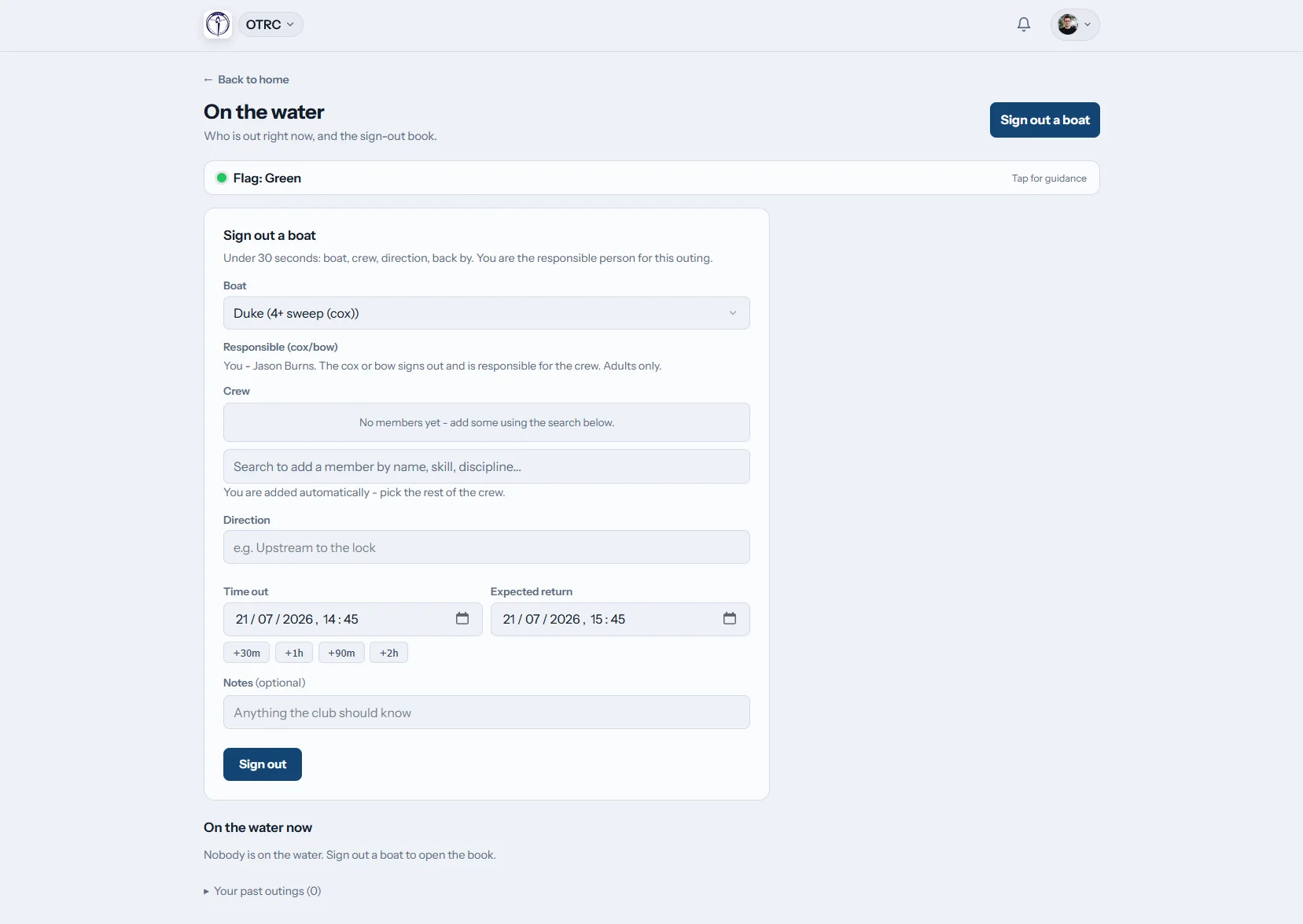
Log the launch
Name everyone heading out
The member records the boat, crew, route and expected return, then closes the entry once ashore. If the time passes, Row HQ notifies the club safety contacts.
The duty person can read every active outing on one board.
Share the call
Put the club's guidance in front of members
A club volunteer selects green, amber, red or black and supplies the wording. The update reaches the member dashboard, in-app notices and email.
Only a person sets the level. Row HQ does not decide from conditions data.
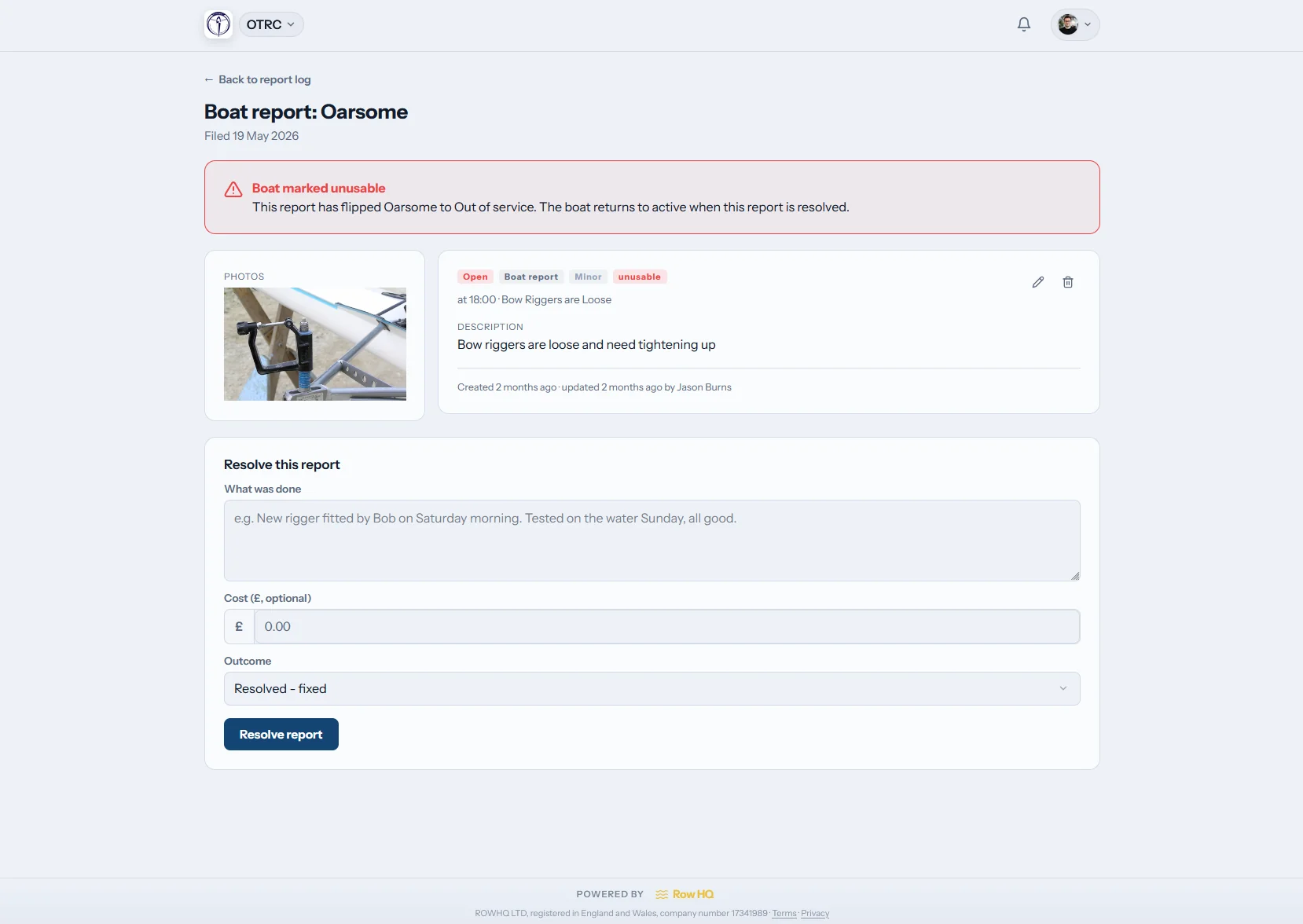
Write the report
Save details before they fade
Use the shared log for an incident or damaged equipment. Add photos, filter earlier reports and let the dashboard tile return volunteers to the log.
The account remains with the club when volunteer roles change.
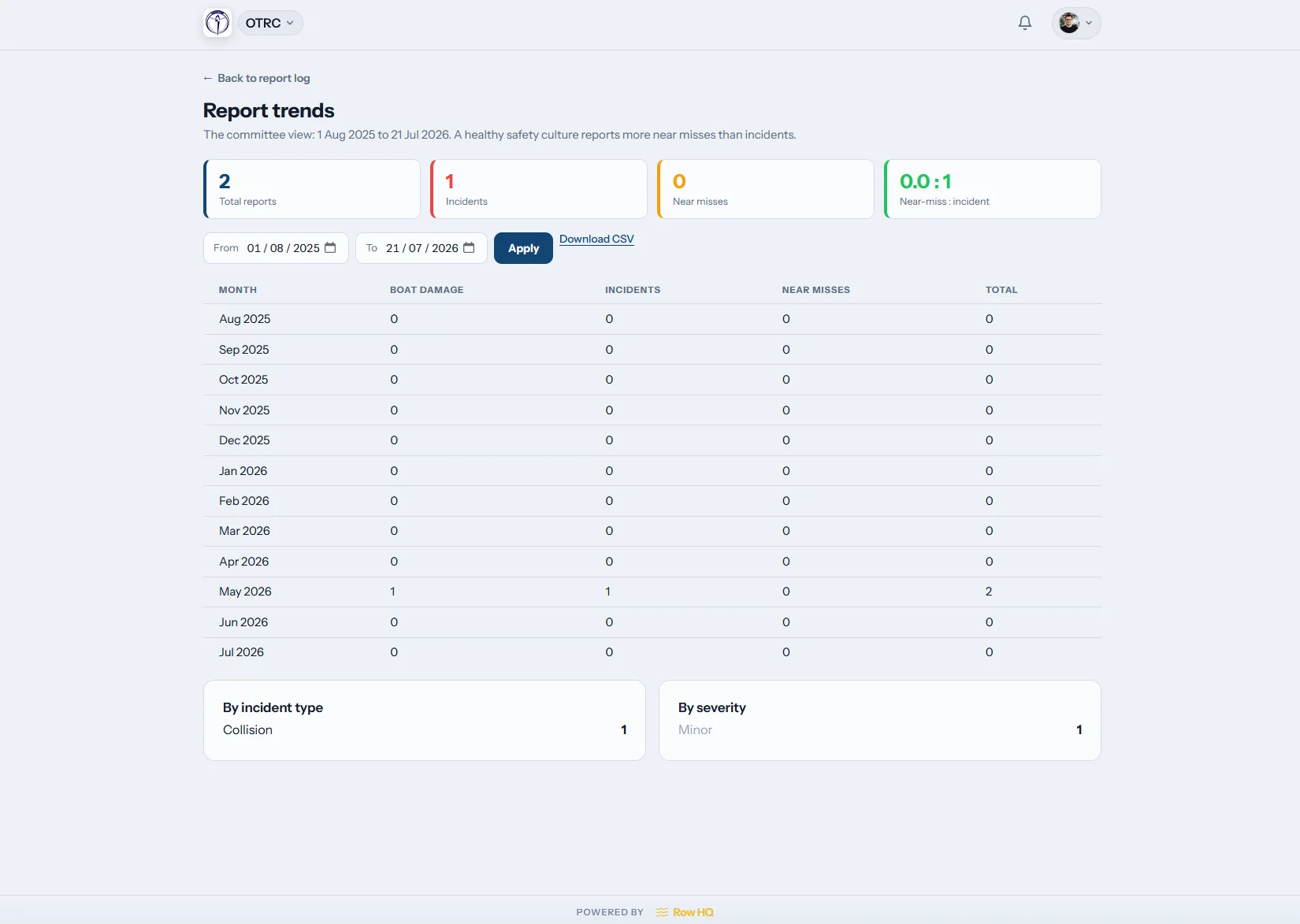
Look for repeats
Read the history across a season
The trends view shows report patterns over time. Officers can identify repeated damage or incident themes across summer racing, winter training and school terms.
The pattern is supported by the reports behind it.
Make volunteer handovers less fragile
Safety knowledge should stay with the club when the roster and committee change.
Information by hand
- Launch details written on paper nobody checks later
- Water calls repeated across parent and squad chats
- Incident accounts held by the volunteer who received them
- Credential renewals remembered by one long-serving officer
- New committee members starting the review from scratch
A shared club account
- A current afloat list with late-crew notices
- One human decision distributed to all members
- Report photos, filters and patterns kept under the club
- Credential status and upcoming expiry attached to profiles
- Safety work visible in the committee dashboard
Enough structure for a busy volunteer team
Row HQ keeps the tools clear for members while giving officers the record needed for later checks.
Boat-out register
Enter the boat, all crew members, intended route and home time. Confirm the return at the end. Put boat bookings close to the same workflow.
Club-written flag guidance
Keep green, amber and red, then enable black if useful. A person selects the level. The text appears through the member portal, in-app and in safety email.
Evidence and credentials
Ask members for proof, approve their upload and track any lapse date. Seeded New Zealand and governing-body types can gate nominated activities. The affiliation-audit export brings the list together.
Weather where the club rows
Show present weather for the club location when useful. Officers decide how to use that information for lake, river or harbour outings, and the software never sets the flag itself.
Club-owned report history
Store incident and damage details with images. Sort the entries, inspect trends and find the log tile in the officer dashboard.
Key profile declarations
Add swimming and tread-water declarations and require an emergency contact. Row HQ avoids collecting any medical or health information.
Pass on the record, not a folder of gaps
Look at Oundle Town Rowing Club for an example of a club running everyday work through Row HQ.
Agree club wording
Set flag instructions, safety contacts, weather display and credential types.
Make sign-out routine
Each crew logs its people, boat, course and expected return.
Pick up open work
Act on overdue crews, fresh reports and credentials near expiry.
Hand over cleanly
Give the next committee the history, trends and audit export.
Put the live safety view in every pocket
Any phone browser can open Row HQ, and iOS or Android apps are available. Push alerts reach volunteers and members around the boatshed. Reports and the current flag remain usable away from a committee laptop.
- Check club instructions before a school or masters outing
- Receive status changes and late-return notices as push alerts
- Add an incident or equipment photo from beside the water

Give volunteers the connected tools
Boat Booking
Keep equipment plans and the water log within one club system.
Member Portal
Let rowers find guidance, declarations and credential requests.
Admin Dashboard
Help office holders pick up reports and safety settings.
Free resources for club officers
Generate a rowing risk assessment Get the risk assessment template Get the incident report templateBrowse other Row HQ tools, see the club-size bands, or read the Oundle Town case study.
Safety records for rowing clubs
Questions volunteer safety officers and committees raise when comparing systems.
No. Row HQ has no governing-body endorsement, does not lodge the review and cannot ensure a result. It records outings, reports, equipment damage and approved credentials through regular club activity. Volunteers can draw on that history when preparing the evidence their governing body requests.
No. Current local weather is a dashboard reference. A person at the club considers the situation and selects the flag. The club can write four sets of guidance or turn black off for three levels. Row HQ does not make water decisions from a feed.
The selected flag and club wording show on every member dashboard. The same change goes through an in-app notice and safety email. Those emails have no opt-out. A flag message informs members, but it does not lock the outing sign-out form.
Each open entry sits on the live outing board with its boat, crew, route and expected return. When the planned time passes, Row HQ contacts the safety people nominated by the club. Signing in again closes the outing and removes it from the active list.
Yes. An officer requests the credential, the member supplies evidence and an admin approves it. Row HQ monitors recorded expiry dates and warns before they lapse. Clubs may make an approved credential a condition for particular activities and export the records for an affiliation audit.
The profile holds swim and tread-water declarations and at least one emergency contact. It does not store medical or health data. Row HQ intentionally keeps that information outside the service while retaining the limited details needed for club safety administration.
Keep the club record through every handover
Give today's volunteers a live view and tomorrow's committee a clear history.
Free up to 20 active members, permanently. After that it is NZ$33 a month for a 21 to 30 member club. Every feature is included on every plan and there are no transaction fees. GST is not included. See full pricing