Start early. Know every crew is accounted for.
Keep water status, live outings, damage reports and member credentials visible across the club. Row HQ gives volunteer committees a record shaped by what actually happened at the boatshed.
Watch the 90-second how-to

How can rowing clubs keep better safety and compliance records?
Row HQ captures the decisions and events around each outing: crew, route, expected return, club-set water status, reports and approved credentials. That matters on hot early starts, changeable rivers and coastal water. When a state association or governing body asks about safety records, the committee can review what members already recorded.
The same safety functions come with every membership band. Clubs with no more than twenty active members can use the free band. Find the right band for your membership.
From flag to trend report in 90 seconds
The video below follows a morning at the boatshed: the flag goes amber with a reason everyone is told, a sculler signs out with route and return time, a loose rigger bolt is reported from her phone, and the committee looks back over outing history and the monthly near-miss trend.
Every outing leaves a useful trail
The record begins before push-off and continues if equipment damage or an incident needs follow-up.
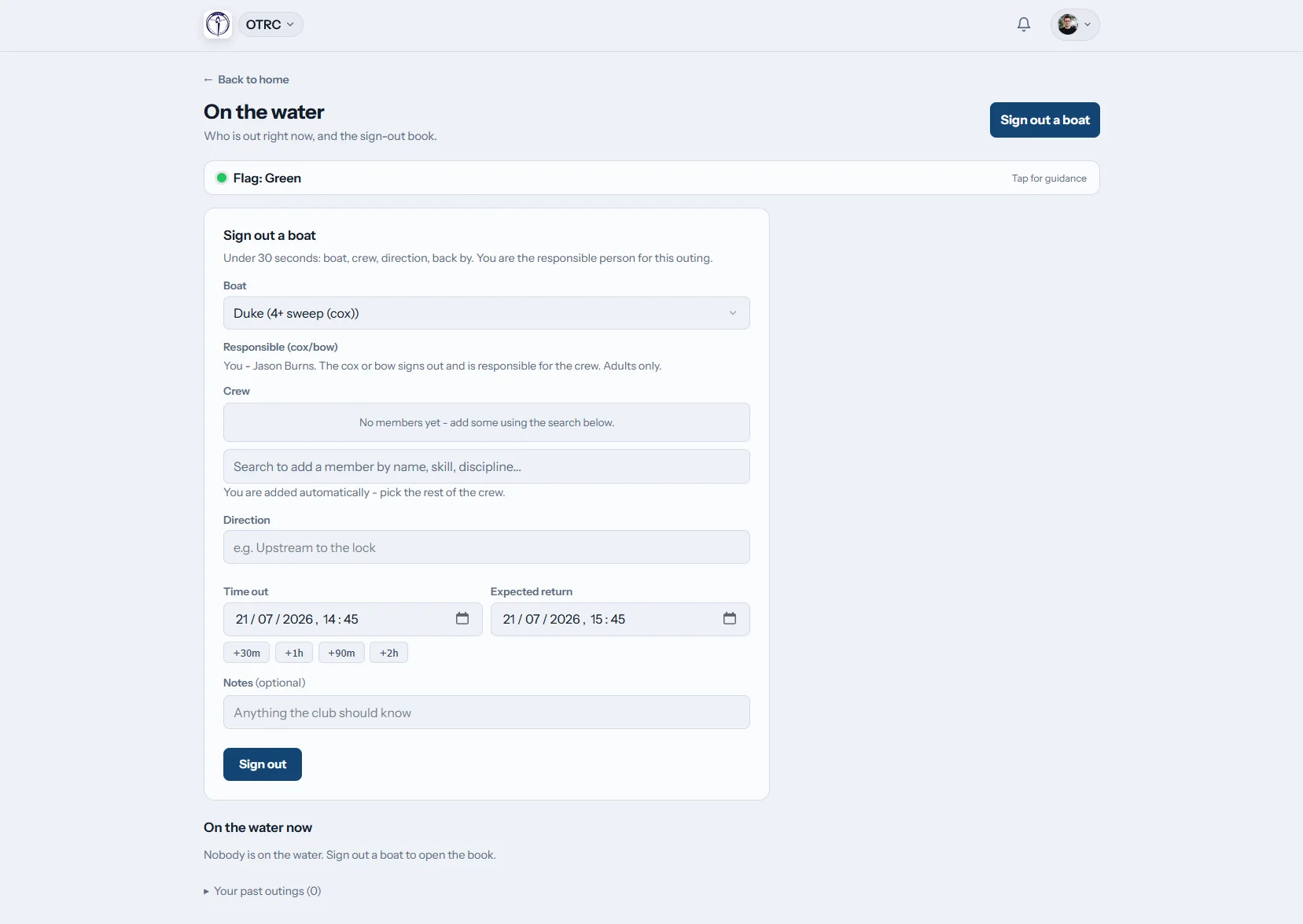
Before push-off
Register the boat and crew
A member enters the boat, crew list, route and due-back time before leaving the pontoon. They close the outing after returning. The club's nominated safety contacts hear when a crew is overdue.
The live display lists every crew still on the water.
Post conditions
Make the club call visible
A club person chooses the current green, amber, red or black level. Rowers get the update in-app and by email, with the club's own guidance attached.
Heat, wind or water information never changes the flag automatically.
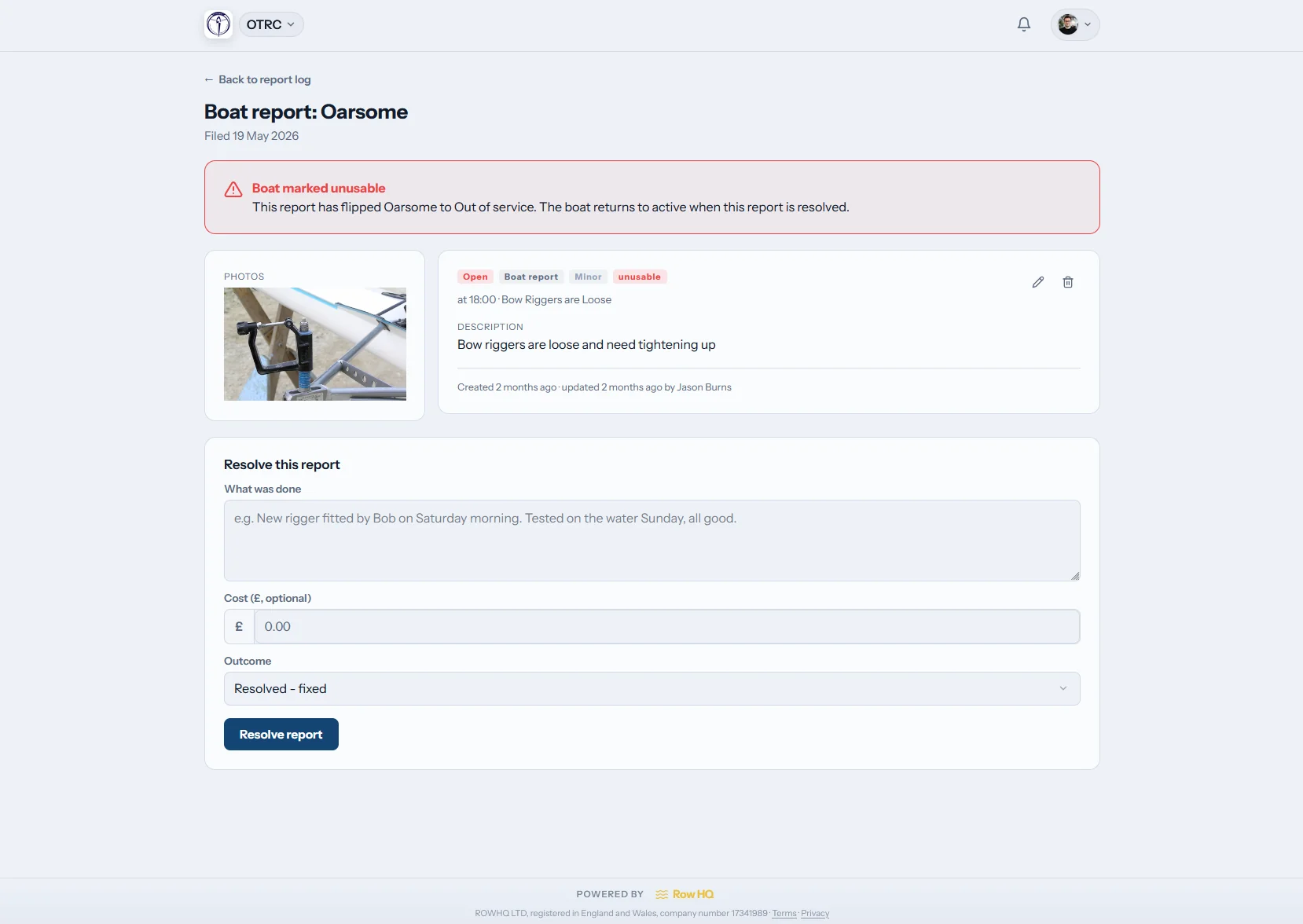
Record the issue
Put photos beside the account
Members use one log for an incident or boat damage. Photos sit with the report, filters find older entries and a dashboard tile opens the shared history.
The committee has one report to revisit after the rush has passed.
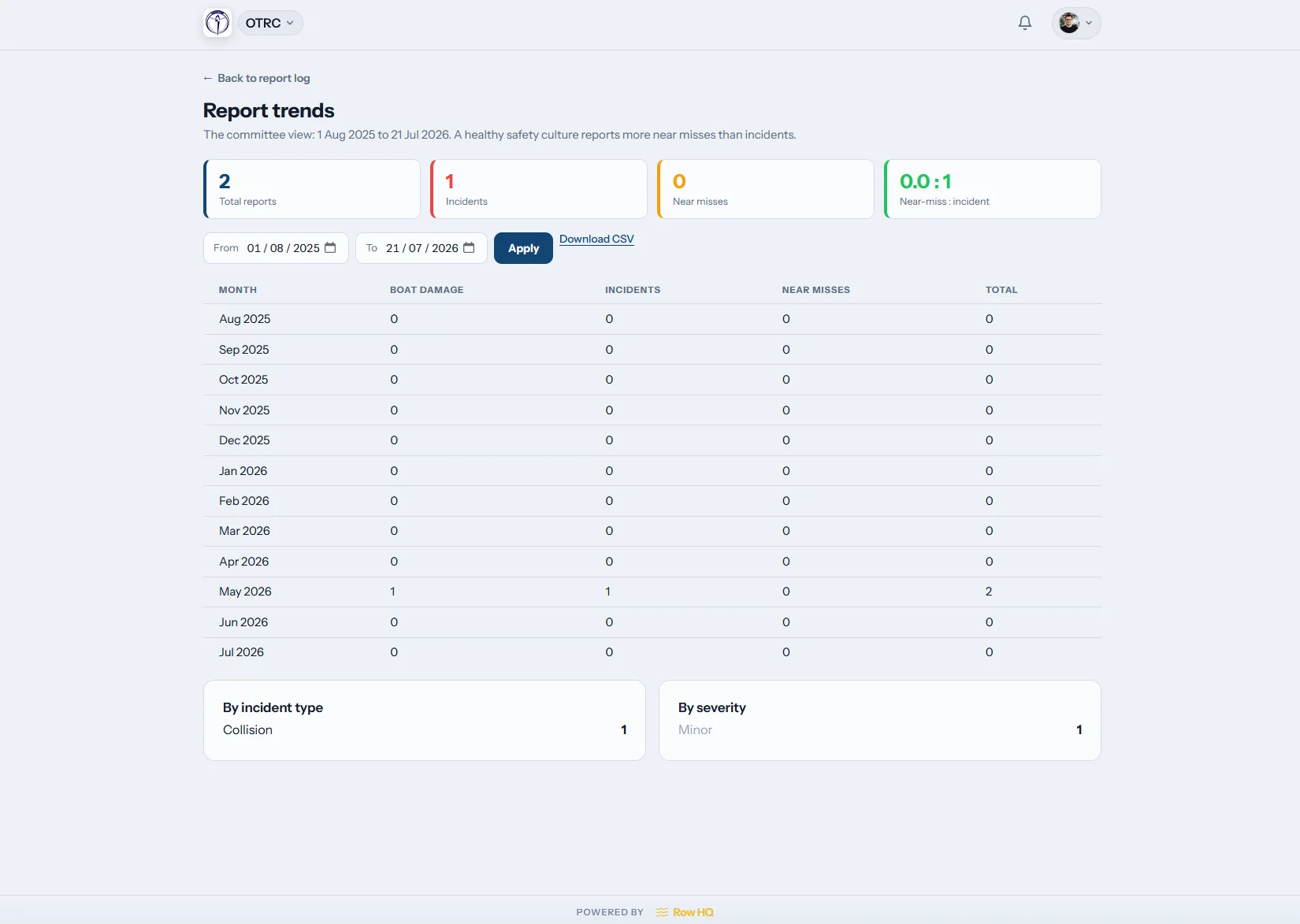
Check patterns
See what keeps recurring
The trends page shows report patterns across time. A committee can identify repeated incidents or wear instead of treating every entry as unrelated.
Longer-term themes stay linked to the club report log.
Leave the paper trail behind
A club record works better when the boatshed creates it as part of the routine.
Across the boatshed
- Names scribbled on a damp sign-out sheet
- Flag changes sent through several chat groups
- Damage pictures saved without the matching report
- Qualification dates checked just before renewal
- Association review notes assembled from different volunteers
Inside Row HQ
- One active-outing board and alerts for late crews
- Club-set status shared through two direct channels
- Combined incident and damage history with photo uploads
- Credential requests, approvals and lapse warnings per member
- Committee evidence reachable from the club dashboard
Built for the decisions made at the boatshed
The club stays in charge of its guidance. Row HQ makes each decision easier to share and easier to find later.
Outing register
Capture the boat, names, planned course and return time, then mark the crew home. Use boat reservations beside the outing workflow.
Flexible club flag
Choose four levels or switch off black for a three-level approach. Club-written labels and guidance reach each member dashboard, email included with no safety opt-out.
Credential checks
Send a request, let the member upload proof, approve it and monitor the expiry. Types seeded for local governing bodies can restrict selected activities. Export the set for an affiliation audit.
Current local weather
Place live weather for the club location on the dashboard. Each club decides whether to show it and remains responsible for reading surf, heat, wind and water conditions.
Shared report log
Photograph damage, file incident details, filter entries and examine the trends view. A dedicated admin tile keeps the log close.
Declarations and contacts
Member profiles include swimming and tread-water declarations plus at least one emergency contact. Medical and health records are purposely not collected.
Build evidence without a separate exercise
For a live example, read about Oundle Town Rowing Club and the club work it runs through Row HQ.
Set local controls
Write flag instructions, name contacts and choose the visible conditions panel.
Use the outing register
Crews enter the boat, route and return plan before the pontoon.
Deal with follow-up
See overdue outings, report work and credentials nearing expiry.
Bring records together
Review reports, trends and affiliation-audit exports for committee checks.
Keep the latest call on every phone
Members can open Row HQ in a phone browser or use the iOS and Android apps. Push notices carry status changes and overdue-outing alerts to the pontoon, while mobile reports can include a fresh photo.
- Read the current club guidance before an early launch
- Receive a phone alert when conditions or return status changes
- Log damage beside the boat instead of writing it up later

Keep club operations in step
Boat Booking
Connect boat availability with the outing routine.
Member Portal
Put guidance, credentials and emergency contacts within reach.
Admin Dashboard
Give committee officers a clear view of outstanding safety work.
Free club safety downloads
Create a rowing risk assessment Use the free risk assessment form Use the free incident report formExplore the whole platform, review membership bands, or see Row HQ in use at Oundle Town.
Club safety system questions
What Australian committees need to know before moving their records online.
No software can promise that. Row HQ is not endorsed by a state association or governing body and does not submit a review for the club. It keeps the outing, report and credential material created through daily use, so officers can examine relevant records when their association asks.
No. Someone at the club makes the decision and selects the level. The dashboard can show current local weather, but it cannot alter the flag. Clubs define the wording behind green, amber, red and black, and may disable black if they run a three-level system.
The selected status appears on each member dashboard with the club's exact guidance. Every member also receives an in-app message and email. Safety messages cannot be opted out of. The notice does not stop a sign-out because the flag itself never gates that action.
The live board shows every open outing. Each entry includes the boat, crew, route and planned return. If that time passes, Row HQ notifies the safety contacts configured by the club. Members close the record by signing back in after reaching the pontoon.
The club requests a credential and the member uploads their evidence. An admin checks and approves it. Expiry alerts arrive before a dated credential lapses. Seeded types reflect the chosen country and governing body, and approved records can gate particular club activities.
No. Row HQ intentionally avoids medical or health information. It records swimming and tread-water declarations, then requires at least one emergency contact on every profile. Clubs get those specific operational details without holding a broader health record.
Put the boatshed record in order
Know who launched, show the club decision and keep follow-up work easy to trace.
Free up to 20 active members, permanently. After that it is A$29 a month for a 21 to 30 member club. Every feature is included on every plan and there are no transaction fees. GST is not included. See full pricing