Make every week on the water count
Bring shells back from winter storage, open bookings, and watch each outing from one fleet screen. Row HQ gives Canadian clubs a better handover than a patchwork of spreadsheets.
Watch the 90-second how-to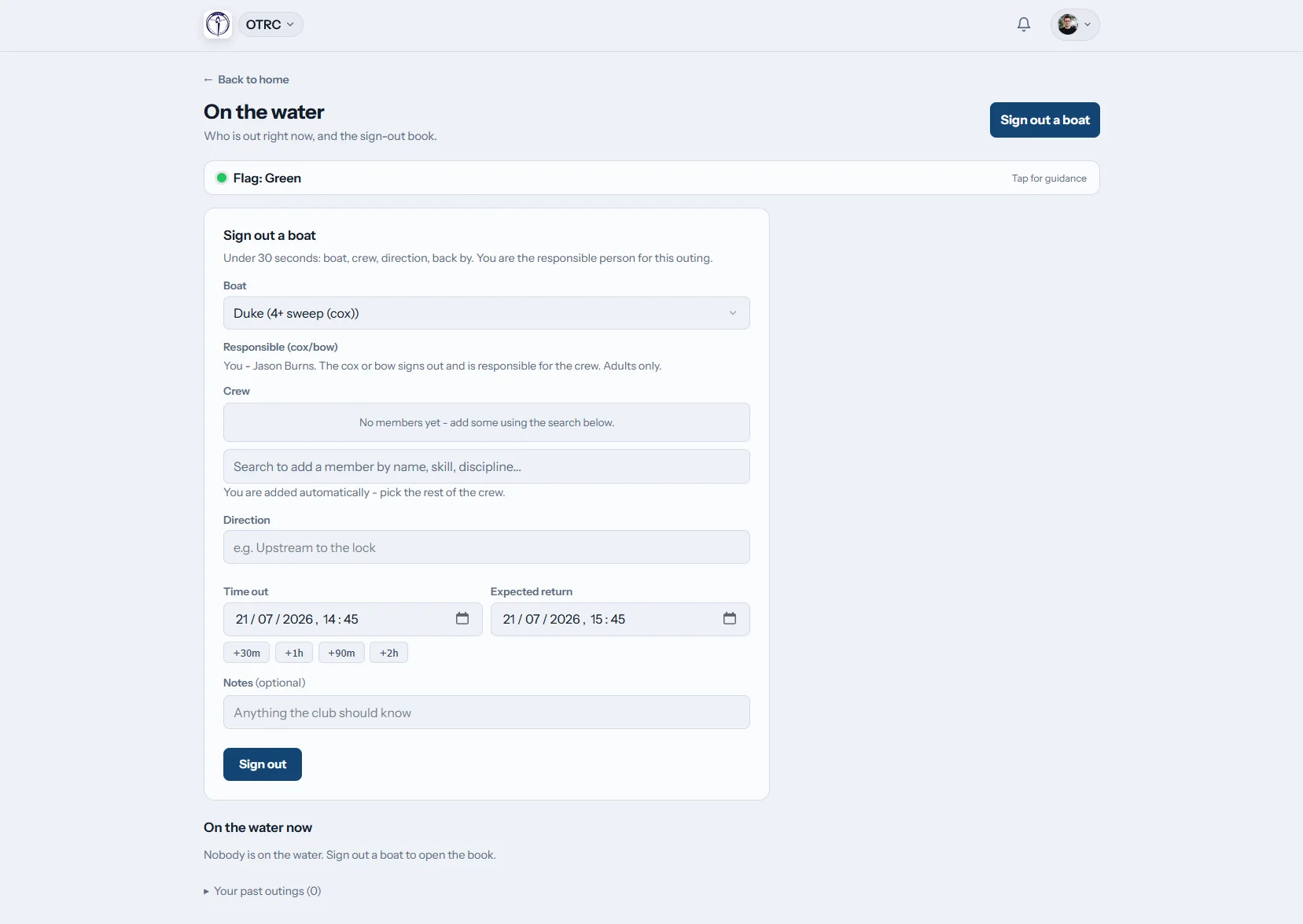

How does Row HQ manage boat bookings?
Rowers reserve a cleared shell from the fleet calendar, then record the crew and return time when they launch. Club staff can follow outings in progress, receive overdue alerts, and close damaged equipment to further use. Booking activity and maintenance stay with the hull through summer operations and the winter work window.
The booking and fleet tools are standard in every plan. View club-size pricing.
See a member book a boat in 90 seconds
Watch a club open its fleet register, switch member booking on, keep program boats blocked during sessions and restrict booking by skill level. In the video below, an intermediate sculler books a single for Monday morning from her phone, and the full day of bookings appears on one timeline.
Bring the fleet from spring launch to autumn haul-out
A continuous hull record helps volunteers move quickly during a short rowing season.
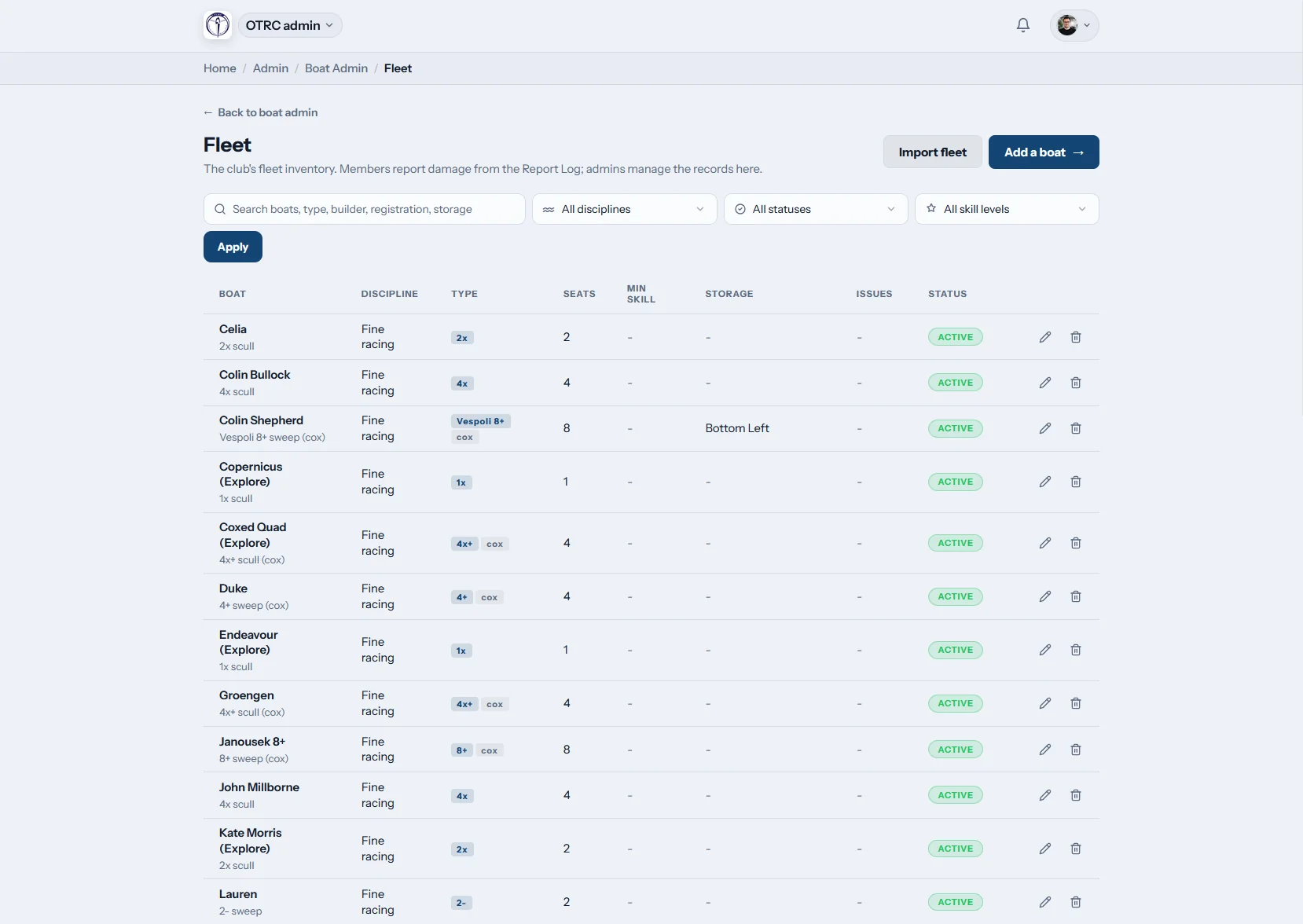
The fleet
Recommission from a reliable inventory
Log rigging, seat capacity, cox details, minimum skill, and rack position against each hull. A CSV import gives clubs a quick route from an existing equipment list.
Storage and setup details remain useful when volunteers bring the fleet back each spring.

Booking rules
Open suitable hulls for each group
Skill settings separate learn-to-row equipment from experienced racing shells. Committees control whether booking runs at all and what remains available while coached sessions are underway.
A privately owned shell is reserved for its member owner and club administrators.
On the water
Follow outings during the busy months
A crew adds its names and due-back time when taking a shell. The live board lets the safety team see current outings and their completed sign-ins.
Named safety contacts are alerted when a boat has not returned as expected.

Damage and repairs
Build the winter job list as issues arise
Members send damage notes and pictures from the dock. Administrators monitor each fix to completion and remove a hull from use whenever its condition demands it.
Open and finished work forms a maintenance record for the next repair window.
Protect a short season from avoidable confusion
Fleet availability, water safety, and repair work should not live in separate volunteer systems.
Seasonal scramble
- Spring setup notes detached from the summer booking sheet
- Learn-to-row groups discovering racing hulls are already taken
- Safety volunteers calling around for overdue crew details
- Dockside damage mentioned once and forgotten
- Winter projects planned without a complete hull history
Row HQ fleet view
- Specifications and storage positions retained year after year
- Skill controls separating development and racing equipment
- Active outings and expected returns visible together
- Late returns routed to responsible safety contacts
- Repair evidence collected before winter maintenance starts
Keep the fleet moving through a compressed season
Give rowers, coaches, and equipment volunteers the same current picture. You can also see the fleet process used by Oundle Town Rowing Club.
Club booking calendar
Rowers select available equipment in the member portal. The club switches booking on when ready and controls access during sessions.
Clearance by ability
Assign minimum ability to each boat class. Coaches can pair fleet access with their work in the coaching area.
Dockside access
Availability and bookings work on a phone, which helps learn-to-row participants and established members check before moving equipment.
Seasonal maintenance record
Photo reports create a useful work list. Administrators close unsafe shells and update repairs through the admin dashboard.
Outing accountability
Crews, launch times, due-back times, and returns stay recorded. The security overview explains how Row HQ handles club records.
Member shells and coaching launches
Clubs may add privately owned shells for the owner and staff. Coaching launches can be reserved by authorised personnel.
Map the learn-to-row and racing fleets
Keep every class visible through recommissioning, summer use, and winter storage. New members can learn about common rowing boat types and rowing shell construction. Coaches place rowers with the crew tools.
Single sculls
Independent training and learn-to-row progression
Double sculls
Paired outings across ability groups
Coxed fours
Development and masters sweep crews
Eights
Large crews for training and regattas
Set practical access for each hull
Boat class, crew size, and seasonal programme all affect the right booking rule.
| Hull | Crew aboard | Seasonal role | Booking consideration |
|---|---|---|---|
| Single (1x) | 1 rower | Learn-to-row progression and solo training | Sculling ability set on the class |
| Double (2x) | 2 rowers | Partner outings in a mixed fleet | Two occupants recorded before launch |
| Coxless four (4-) | 4 rowers | Experienced sweep preparation | Senior clearance applied |
| Coxed four (4+) | 4 rowers, 1 cox | Junior and masters development | Cox included on the outing |
| Quad (4x) | 4 rowers | Summer sculling groups | Session availability decided by the club |
| Eight (8+) | 8 rowers, 1 cox | Regatta crews and squad training | Appropriate skill group required |
Illustrative fleet classes and access considerations. Canadian clubs choose their own configuration.
Capture the update before anyone leaves the dock
The mobile app shortens the gap between seeing a problem and recording it. That matters when club staff have only a few months to keep every usable hull moving.
- Confirm a shell is open before carrying it outside
- Attach clear photos to a fresh damage report
- Review the club flag before pushing off

Link equipment with club operations
Training Sessions
Reserve or release hulls around coached blocks.
Events
Plan crews and equipment for a compact regatta calendar.
Admin Dashboard
Review repairs, availability, and fleet information together.
Useful guides
Plan a seasonal fleet maintenance cycle Organise the club training timetable Make crew selection easier to follow Understand the parts of a rowing shell Identify the main rowing boat classes Learn the difference between scull and sweepContinue with the Row HQ FAQ, review club experiences, or compare options on the pricing page.
Canadian boat booking questions
Answers for clubs planning spring setup and summer fleet use.
Yes. An administrator can upload a CSV list or add hulls one at a time. The resulting records include class, rigging, seats, cox needs, ability threshold, and storage position. Clubs then enable booking and choose how scheduled sessions change individual availability.
Set a minimum skill on each boat class. Members can only book equipment suitable for their current clearance. A member-owned shell remains available to its owner and designated staff. Coaching launches are also held in the inventory for authorised staff use.
No. Row HQ refuses overlapping bookings on a single boat. A club may also block equipment during a scheduled training session or leave it open for individual use. The current calendar lets members check the result before travelling to the water.
Each sign-out names the crew and expected return. Active boats remain on the live board until they sign back in. Row HQ alerts the chosen safety contacts if an outing becomes overdue. Members can also consult the current club flag on mobile.
They will. Rowers add notes and photos on their phones as soon as damage is found. Administrators can close the shell to bookings, track the work, and record completion. By haul-out, the club has a maintenance history for every affected hull.
Start the season with a current fleet record
See how Row HQ handles bookings, active outings, and the maintenance work still ahead.
Free up to 20 active members, permanently. After that it is C$27 a month for a 21 to 30 member club. Every feature is included on every plan and there are no transaction fees. GST/HST is not included. See full pricing