A clear plan for every shell
Give athletes a reliable way to reserve equipment, log an outing, and flag damage. Row HQ keeps team boat assignments out of shared spreadsheets and puts the current fleet status on every phone.
Watch the 90-second how-to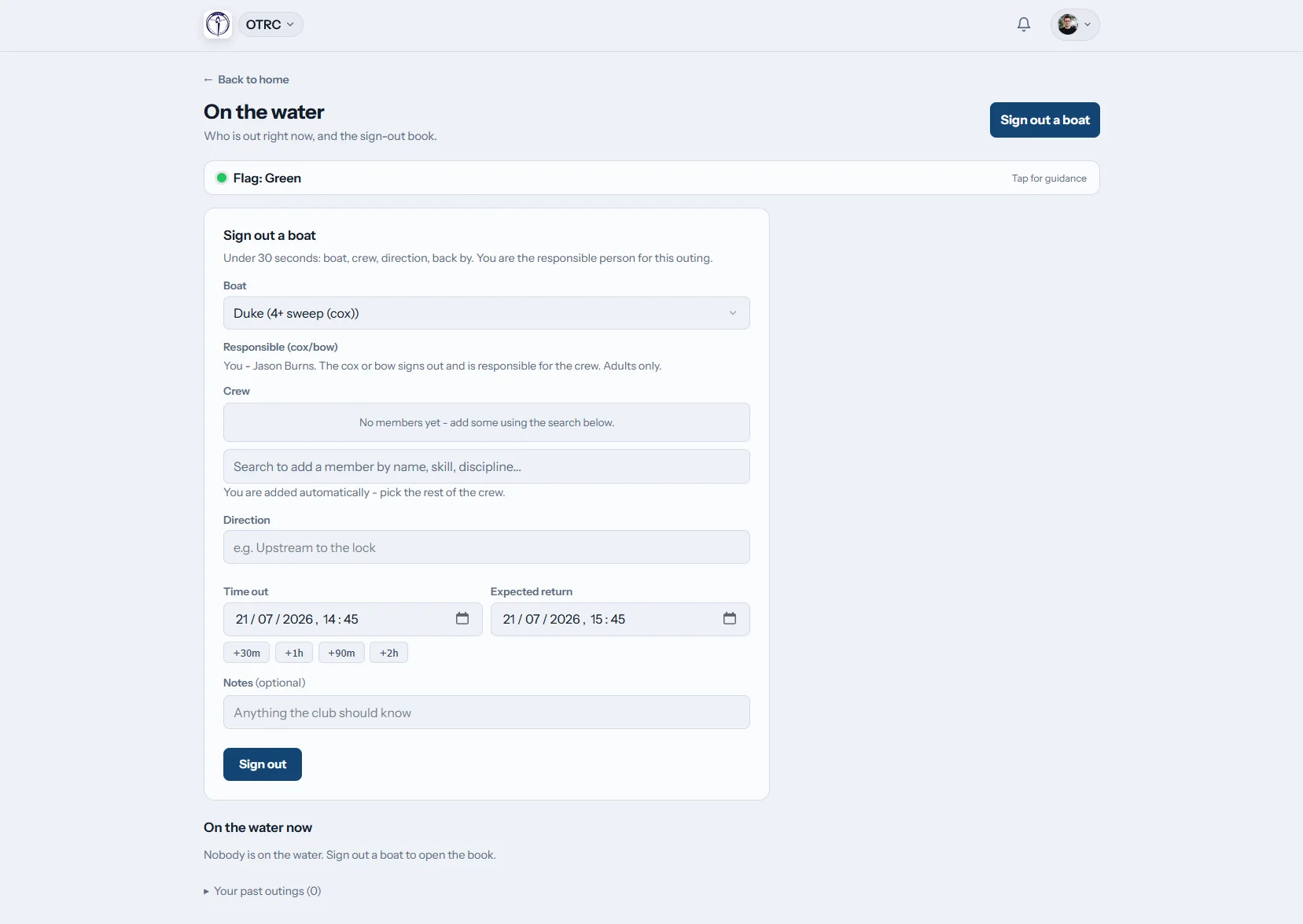

How do shell reservations work in Row HQ?
Athletes open the fleet calendar, find a shell approved for their skill level, and make a reservation. At launch, the crew signs out with an expected return time. Coaches see active boats on a live board, and equipment managers receive one connected record for damage, maintenance, and return to service.
Fleet reservations come with every Row HQ plan. Check pricing for your program.
Watch a shell reserved in 90 seconds
This how-to video starts in the fleet register, where every shell has a skill level and a rack. The equipment manager turns reservations on, keeps practice shells blocked and limits reservations by skill. An intermediate athlete then reserves a single for Monday morning and only sees shells she is approved to row.
Move from equipment room to water without guesswork
Every step uses current information from the same fleet database.
The fleet
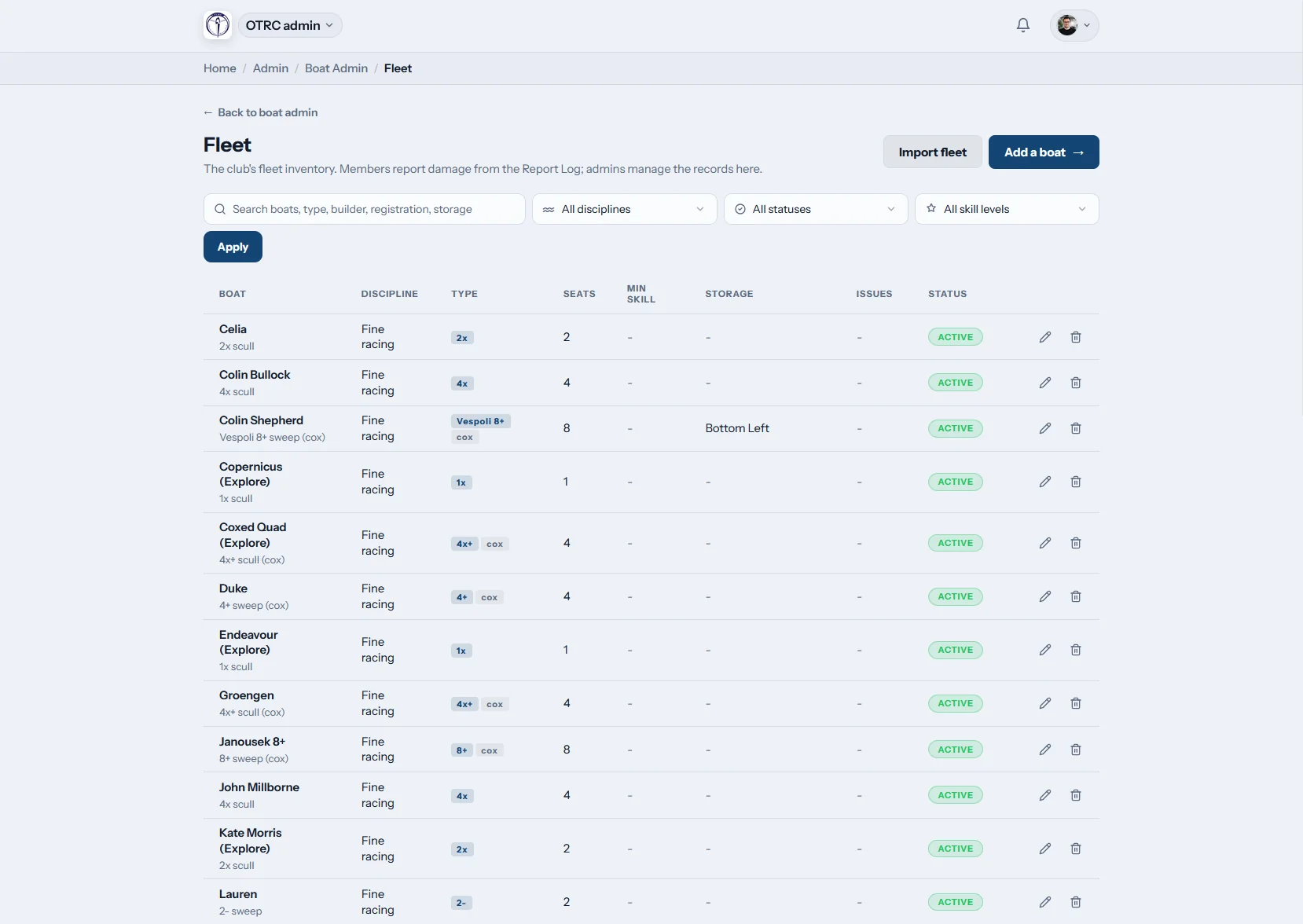
Catalog each shell once
Store the rig, seat count, coxswain requirement, minimum athlete level, and bay location for every shell. Equipment managers can upload an existing fleet list by CSV.
Junior, collegiate, and masters equipment can share one searchable inventory.

Booking rules
Reservations follow team clearances
Skill limits keep developing athletes out of advanced shells. Programs choose whether reservations are enabled and whether scheduled practices block or permit individual use.
An athlete-owned shell is offered only to its owner and authorized staff.
On the water
Know which lineup has launched
The sign-out captures the shell, full lineup, and planned return. Coaches and boathouse staff use the live board to follow current outings through sign-in.
When a crew is late, Row HQ notifies the designated safety contacts.

Damage and repairs
Give equipment staff a usable report
An athlete can submit damage with phone photos immediately after practice. Staff track the job until it is resolved and take the shell out of service when necessary.
The original report and completed repair remain part of the shell record.
Stop reconciling three versions of the fleet
A reservation is more useful when staff can connect it to the actual outing and any follow-up work.
Disconnected records
- A reservation spreadsheet that misses coach changes
- Varsity and novice lineups competing for the same equipment
- Launch details written on a board nobody can see remotely
- Repair photos scattered through texts and group chats
- Equipment managers rebuilding history before each season
One Row HQ record
- A fleet catalog with rig, clearance, and bay information
- Reservation access matched to athlete skill
- Current crews and expected returns shown live
- Late outings escalated to safety contacts
- Repair status and photos saved with the shell
Fleet control for busy rowing programs
Coordinate shells across youth, collegiate, and masters schedules. The Oundle Town case study shows the same system operating at a UK club.
Reservation calendar
Athletes reserve through their member portal. Staff can enable reservations program-wide and permit or block equipment during practices.
Athlete clearance rules
Assign a minimum skill level to each shell class. The coaching tools help coaches manage lineups beside those rules.
Reservations by phone
A rower can confirm equipment before driving to the boathouse. Current availability is visible without asking a coach or equipment manager.
Maintenance history
Photos, open work, and completed fixes stay together. Equipment staff mark unsafe shells unavailable in the admin dashboard.
Launch and return log
Record each lineup, departure, expected return, and sign-in. Row HQ explains how program information is protected on the security page.
Personal shells and coach launches
Programs may register athlete-owned shells with owner-only access. Coach launches remain in the fleet for staff reservations.
Organize every shell class
Keep racing shells, learn-to-row equipment, personal boats, and coach launches in one catalog. Review rowing boat types or the rowing shell guide, then build team assignments with the lineup tools.
Singles
Program and athlete-owned sculling shells
Doubles
Two-seat sculling for paired training
Coxed fours
Sweep shells with a coxswain position
Eights
Varsity, JV, novice, and masters lineups
Match shell access to the lineup
Different equipment calls for different clearance and practice rules.
| Shell | Lineup | Program use | Access consideration |
|---|---|---|---|
| Single (1x) | 1 athlete | Independent sculling and technical work | Sculling clearance required |
| Double (2x) | 2 athletes | Partner practice and development rows | Both seats listed at launch |
| Coxless four (4-) | 4 athletes | Experienced varsity sweep lineups | Advanced skill threshold |
| Coxed four (4+) | 4 athletes, 1 coxswain | Junior, novice, and masters crews | Coxswain named on sign-out |
| Quad (4x) | 4 athletes | Sculling groups and fall racing work | Practice blocks set by staff |
| Eight (8+) | 8 athletes, 1 coxswain | V8+, 2V8+, JV, and novice work | Team skill access enforced |
Sample shell classes and common program constraints. Each organization controls its settings.
Handle the fleet where the work happens
Athletes and staff can complete the important equipment tasks at the rack, dock, or trailer. The mobile app keeps the latest update available to the rest of the program.
- Reserve approved shells before arriving for practice
- Send equipment managers photos with a damage report
- Check the current club flag before launching

Carry equipment details into the schedule
Practices
Choose whether practice equipment can receive separate reservations.
Regattas and Events
Keep race planning near the crews and shells that will travel.
Admin Dashboard
Give coaches and equipment staff one place to run the fleet.
Read next
A practical shell maintenance routine Build a clearer practice schedule How coaches approach lineup selection How a rowing shell is built A guide to racing shell classes Sculling compared with sweepFor more buying details, visit the software FAQ, read feedback from rowing organizations, or open the pricing guide.
Shell reservation FAQs
What coaches and equipment managers ask before moving the fleet online.
Staff can enter equipment individually or upload the fleet from a CSV file. Records cover shell class, rigging, seats, coxswain needs, minimum skill, and storage bay. Once the catalog is ready, the organization decides whether reservations run and how scheduled practices affect availability.
Only when their clearance meets the minimum skill set for that class. That protects advanced team boats without requiring coaches to review every request. Athlete-owned shells are limited to their owner and authorized staff. Coach launches can be reserved by staff through the fleet.
Yes. Two people cannot hold the same shell for an overlapping period. Staff also control how the reservation calendar behaves during scheduled practice. A shell may stay open for individual use or be blocked for the team assignment, depending on the program setting.
The launch log includes the shell, lineup, departure, and expected return. Its live board shows every active outing until sign-in. If a crew passes the return time, the system sends an alert to the named safety contacts. Athletes can also view the club flag.
Athletes submit a mobile report and may add photos before details are forgotten. Equipment staff track the issue through repair, record the outcome, and make the shell unavailable if it should not launch. That maintenance history remains linked to the equipment record.
See your fleet and lineups in one place
Use a demo to test reservations, launch tracking, and maintenance with your program structure.
Free up to 20 active members, permanently. After that it is $21 a month for a 21 to 30 member club. Every feature is included on every plan and there are no transaction fees. Sales tax is not included. See full pricing