The right boat, ready for the next crew
Check the boat park, reserve a suitable hull and see every crew still out. Row HQ replaces the whiteboard and shared booking spreadsheet with a fleet record the whole club can use.
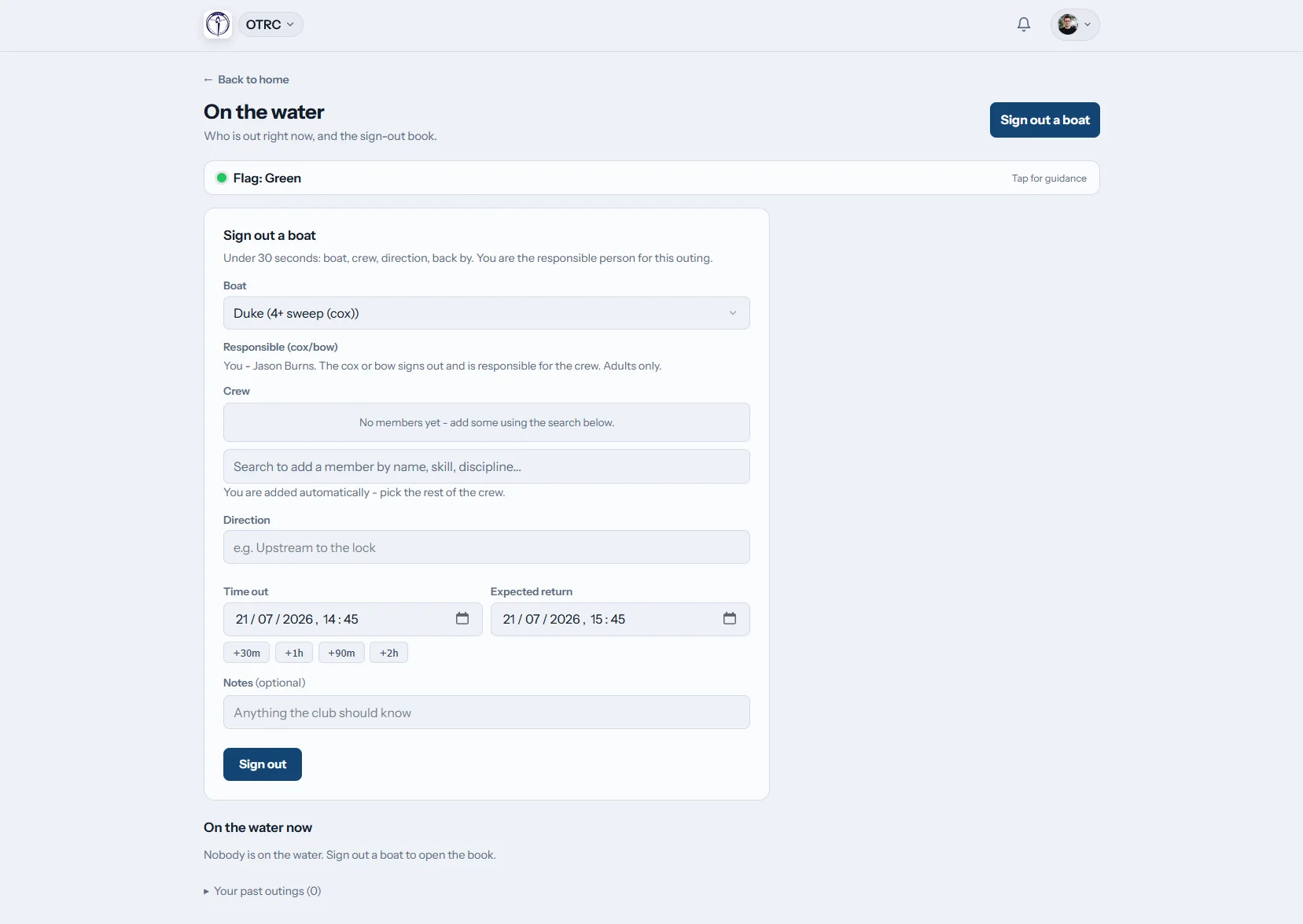

How does Row HQ handle boat booking?
Rowers look at upcoming availability, select a boat that suits their clearance and book it on mobile. Before leaving the ramp, they enter the crew and return time. The live screen tracks boats still afloat, while faults, photos and maintenance work remain attached to the hull for club staff.
Fleet booking is part of every plan. Find pricing for your membership size.
Keep the boat park moving through a full programme
School crews, club squads and private scullers all work from the same current fleet information.
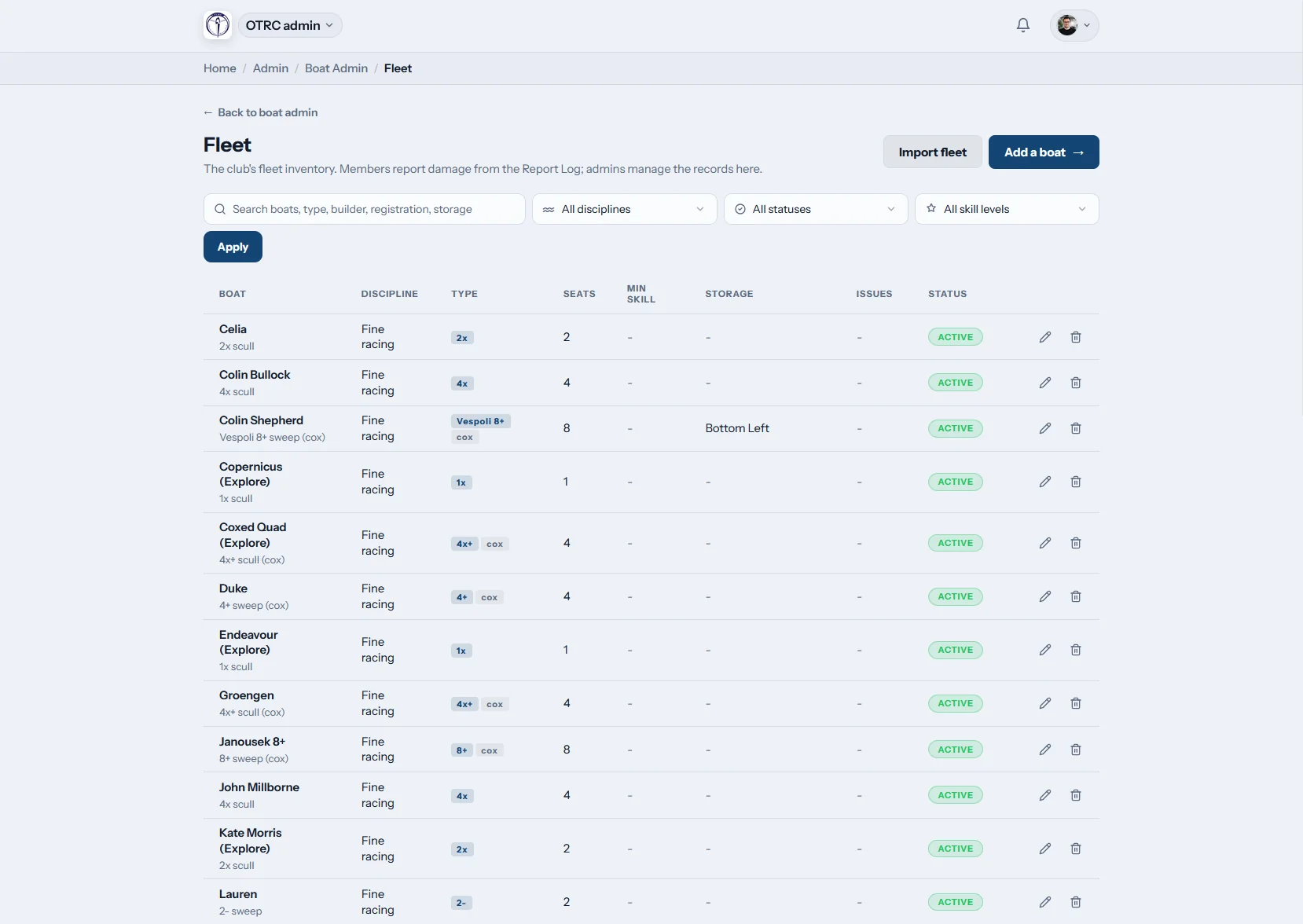
The fleet
Know every hull and where it lives
Save class, rigging, seats, cox needs, minimum ability and storage position for each boat. Existing fleet data can be brought in with a CSV file.
Boat-park moves and trailer preparation start with a register people can trust.

Booking rules
Give each crew the right level of access
Skill restrictions protect premier hulls from unsuitable bookings. A club can disable booking or choose if boats remain open while school or squad sessions take place.
Private sculls appear to their owner and the authorised club team only.
On the water
See the crews beyond the ramp
A sign-out records the boat, everyone aboard and the expected time home. The live board remains current as crews launch and sign back in.
Overdue notifications reach club safety contacts, with the club flag available to rowers.

Damage and repairs
Keep a fault from reaching the next crew
Members report damage on their phones and add photographs. Administrators can make the boat unusable, monitor the repair and record the final resolution.
Each season's maintenance story stays with the correct hull.
Move beyond the whiteboard at the ramp
Fleet decisions fail when school coaches, club members and safety volunteers hold different information.
Scattered club notes
- A marker board that no longer matches the boat allocation sheet
- School crews taking a hull already promised to a club squad
- No remote view of boats still out on the lake
- A damaged rigger mentioned in messages but never logged
- Private sculls mixed into general club availability
A shared fleet picture
- Boat setup, clearance and location stored together
- Session availability decided in advance by the club
- Every launched crew shown until safe return
- Fault pictures and repairs attached to the equipment
- Owner-only boats and staff launches given proper access
Fleet control for club and school rowing
Keep the morning launch orderly and the maintenance list honest. For another club perspective, read how Oundle Town Rowing Club uses Row HQ.
Availability calendar
Rowers book from the member portal. The committee controls when booking runs and how session time affects each hull.
Skill-based access
Set the required standard on each class so newer rowers see suitable equipment. Coaches use the coach tools for the connected crew work.
Booking on mobile
Members can see what is free before driving to the club or walking into a crowded boat park.
Repair register
Turn photos into traceable maintenance jobs. Staff remove unsafe boats from use through the admin dashboard.
Water log
Keep names, launch, due-back and return information for each trip. The security page covers how club data is looked after.
Private sculls and coach boats
Where permitted, a member can register a personal boat. Coaching launches remain bookable by club staff.
One list from the 1x to the 8+
Cover school boats, club crews, private sculls and launches without splitting the inventory. The glossary introduces rowing boat classes and rowing shells. Coaches put names into seats with the crew builder.
Singles
Solo club training and member-owned sculls
Doubles
Two scullers in one shared booking
Coxed fours
School and club sweep combinations
Eights
Premier and age-group crews
Apply access that suits the crew boat
Class rules help a mixed club fleet support independent rows and organised crews.
| Boat | Aboard | Common programme | Fleet control |
|---|---|---|---|
| Single (1x) | 1 rower | Solo training and learn-to-row progression | Sculling level checked |
| Double (2x) | 2 rowers | Partner development and club rows | Two rowers on the outing record |
| Coxless four (4-) | 4 rowers | Premier sweep preparation | Advanced skill access |
| Coxed four (4+) | 4 rowers, 1 cox | School and masters crews | Cox listed before launch |
| Quad (4x) | 4 rowers | Squad sculling and regatta training | Session hold selected by the club |
| Eight (8+) | 8 rowers, 1 cox | Maadi Cup and premier campaigns | Suitable crew clearance |
Typical hull uses and sensible access choices. Every New Zealand club configures its own fleet.
Update the fleet at the water
Rowers can complete the important checks on the device already in their pocket. The next crew sees the change without waiting for someone to reach a laptop.
- Reserve an approved hull before reaching the boat park
- Photograph and report a fault as soon as it is found
- Check the club flag before heading onto the lake or river

Fit boat access around the rowing programme
Training Sessions
Set what members may book while team sessions run.
Events
Bring crew and equipment planning into the regatta calendar.
Admin Dashboard
Maintain boat data and work through open repair reports.
More for fleet and coaches
Set a sensible boat maintenance routine Plan the club and school training week Work through crew selection decisions Understand what a rowing shell is Learn the standard rowing boat types See how sculling differs from sweepFor the remaining details, browse the software FAQ, read club feedback, or compare the available plans.
Boat booking FAQs for New Zealand clubs
What clubs ask when one boat park serves several rowing groups.
Yes. Load it from CSV or create each boat manually. The register holds class, rigging, seats, cox requirement, minimum skill and storage spot. Once those records are ready, the club turns booking on and chooses whether sessions block individual access.
Yes. Minimum skill is applied to boat classes, so each rower only sees suitable choices. Member-owned sculls stay restricted to their owner and club staff. Coaching launches can also be listed and reserved only by staff who need them.
Yes. Once a boat has an overlapping booking, Row HQ will not accept another one. Committees also decide whether team sessions close boats to personal bookings or leave them available. Rowers see that current position before coming down to the club.
The sign-out contains the boat, crew and expected return. A live board lists all current outings until they are signed in. If a return becomes overdue, nominated safety contacts get an alert. The mobile app also shows the current club flag.
They file a mobile report and can attach photos. An administrator reviews it, makes the hull unavailable if required and tracks the repair through completion. The notes and final resolution remain on the boat record for future maintenance decisions.
Give every crew the same fleet picture
Test booking rules, live outings and damage reports against your club programme.
Free up to 20 active members, permanently. After that it is NZ$33 a month for a 21 to 30 member club. Every feature is included on every plan and there are no transaction fees. GST is not included. See full pricing