Practice Without the Group-Chat Sprawl
No more 5am texts asking which boats are going off the dock. Lineup confirmed before the alarm goes off.
The honest answer in 30 seconds
Publish the practice grid a week ahead, split into AM water and PM erg blocks where that applies, take one-tap availability, and close the window the night before so the cox knows the boat off the dock. Real Canadian pattern in 2026: Western, Brock, McGill, Queen's, UVic and UBC squads ping the AM lineup the night before, CSSRA schools post the after-class water schedule for Brentwood, Ridley, St Andrew's and Shawnigan crews on Sunday, and the cox marks attendance at the dock on a phone before push-off. The data flows straight into crew selection and into the RCA Safe Sport participation log. Rowing Canada Aviron, Rowing Ontario and Rowing BC all push clubs toward a single record of who was at practice. One platform replaces three GroupMe threads, a Google Doc, and the coach's memory.
A Canadian programme runs on a brutal calendar. Water opens around the May long weekend on Lake Ontario and shuts when the ice comes in November. The Royal Canadian Henley build sits in the middle, and a chunk of squad time around it lives in the gym. Add varsity timetables, boarding-school dorm rules, masters work shifts and a cox running attendance off her phone at the dock, and practice admin becomes a real job. Row HQ's training session management tools were shaped around those pieces.
How do you organize rowing training sessions properly?
Build the week as a grid the squad can see at a glance. University programmes set the AM water session (6am off Elk Lake, the Burnaby reach, the Hanlan Bay channel or down at Henley Island) plus the PM erg or weights block. CSSRA schools post the after-class water hit and the exam-period erg replacement. Masters crews list the weekday early sessions that fit around work and the longer weekend outing. Members confirm in one tap. The coach locks the lineup, the system notifies everyone, and the cox checks people in on the phone at the dock.
How Row HQ handles training sessions
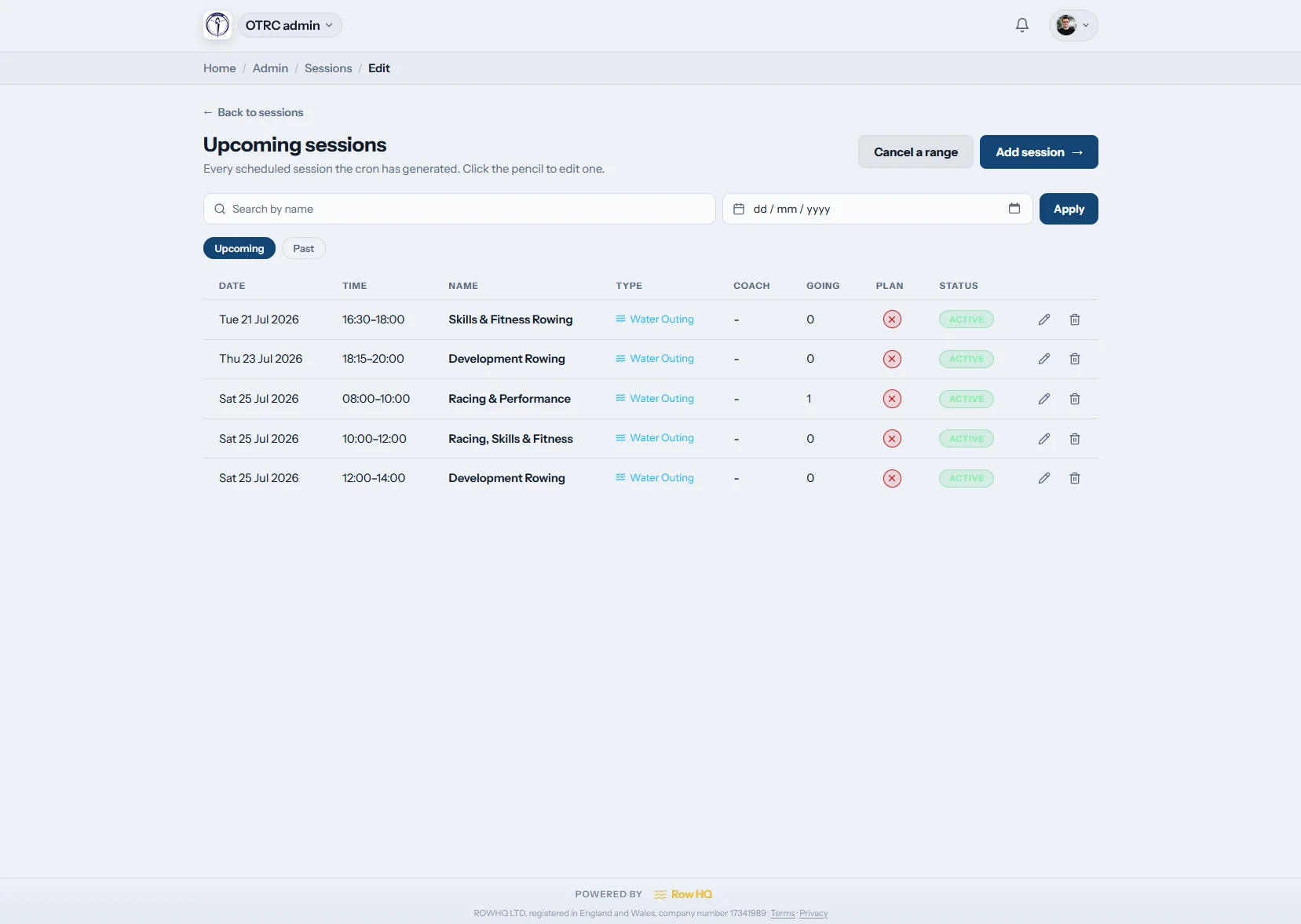
The session module was built around the realities above: a varsity AM/PM split, a CSSRA after-class block, a masters early-week shift, and a cox who needs to mark attendance with cold hands at the dock. Coaches plan the week in minutes. Athletes see the practice grid on their phone and confirm with one tap.
Session Types That Match a Canadian Programme
A Canadian week is rarely just water. Varsity squads run double days; schools cover land-based fitness when ice closes the lake; masters crews mix weekday ergs with the weekend outing. Row HQ tracks the full picture in one place:
-
Water Sessions: On-water work with boat assignments, crew configurations, and launch and coxbox sign-out in one place. Cox marks attendance off her phone at the dock.
-
Erg Sessions: The Concept2 work that replaces water from November through March in Ontario and Quebec, the steady-state hour at the back of a Vancouver or Victoria PM session, and the exam-week erg block CSSRA schools run when crews cannot get to the lake. Splits feed into your erg data.
-
Circuits and Weights: Strength sessions in the varsity gym, on-deck circuits and the school-day land programme tracked alongside the water and erg blocks so the squad workload is visible in one view.
Scheduling That Survives a Real Programme
Setting up the week should not eat a Sunday afternoon. With Row HQ, you can:
- Build recurring AM water and PM erg patterns that roll through the term automatically
- Cap a session at the seats available, so a 5+ goes out as a quad not a half-empty four
- Assign coaches and launch drivers, with auto-notifications when the schedule changes
- Lock confirmations at a fixed cut-off (most varsity squads use 9pm the night before)
- Filter the practice grid by squad, by boat class, by coach, or by erg vs water
How does Row HQ track attendance at the dock?
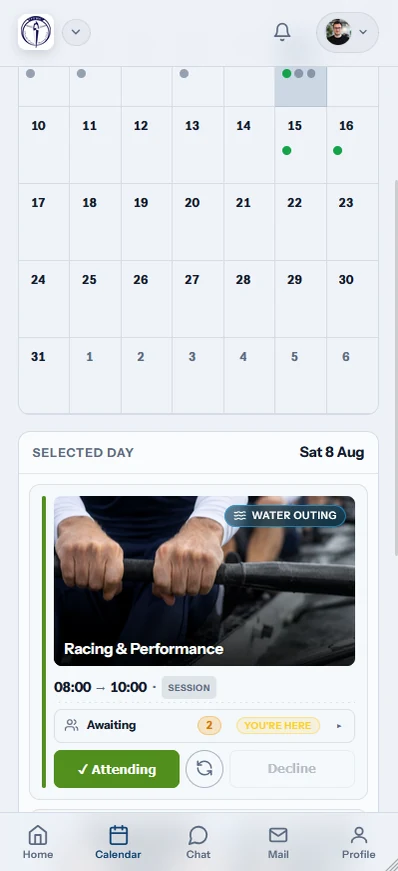
Athletes confirm a practice in one tap from their phone. The coach watches the confirmation list update through the evening, and the system flags anyone who has not responded as the cut-off approaches. At the dock the cox opens the lineup and marks who turned up, who is late and who is missing. After the session, the cox closes it out. That record feeds straight into selection, into the colour-coded weekly attendance view, and into the RCA Safe Sport register without anyone retyping a thing.
Before the Session
Athletes set availability through the app or member portal. The coach has an honest headcount the night before, time to call a sub from the development squad if a seat is short, and a clean basis for crew planning. Reminders nudge anyone still on the fence at the 8pm mark, and the deadline locks the lineup before the alarm goes off at 5am.
During the Session
Cox or coach taps each seat as the athlete arrives at the dock. Latecomers and no-shows are captured in the same screen. Over a CSSRA season or an OUA fall block, the record builds into an honest picture of who is putting the work in - the kind of record selection conversations actually need.
After the Session
Attendance flows into the admin dashboard and into the membership record. Coaches see the squad-wide trend, programme directors see the per-athlete history that feeds the Safe Sport audit, and the captain knows which novices have quietly stopped turning up after midterms.
Why Attendance Tracking Matters
Fair Crew Selection
Pick the boat for the OUA Championship, the CSSRA semi-final or the Henley heat from a full season of attendance and erg data, not from who happened to be on the dock the morning of seat racing.
Track the Build
Watch each athlete's session count through the April-to-July Royal Canadian Henley build and reward the people who showed up to every 6am steady state.
Member Retention
Spot the novice whose attendance halved after reading week, or the masters athlete who stopped coming Saturdays, and reach out before the membership lapses for good.
Data-Driven Planning
See which sessions fill (the 6am water before exams) and which ones empty out (the optional Friday erg). Trim the programme to what athletes actually use rather than what looks tidy on paper.
What changes in practice
Getting the practice admin right pays back well beyond the saved hours. Here is what Canadian clubs notice in the first season after the switch:
What clubs notice after switching
A Sunday-night lineup that took two hours of group-chat work drops to twenty minutes
A hard cut-off plus an automated reminder cuts the 5am dropouts that wreck a coxed four
Cox knows the lineup before the trailer is parked; boat goes off the dock on time
The line we hear most from Canadian coaches is the same one: they know the boat off the dock before the alarm goes off. No 5am scramble, no half-empty four going out because two athletes overslept. The cox just opens the lineup on her phone. Read the deeper write-up in our OTRC case study, and try the free erg pace calculator for converting splits across the Canadian test distances.
Better Planning, Better Results
Know who is coming and you write a sharper practice plan. Track attendance across a CSSRA season or an OUA fall block and you make defensible selection calls. Hand athletes a self-service portal for their own confirmations and the late-night coach texts disappear.
The pieces stack. Honest planning produces a sharper practice. Sharper practice keeps athletes in the boat. More athletes in the boat means a deeper squad for selection. The next week of admin gets easier, not harder.
Getting Started is Easy
Switching to Row HQ does not mean throwing out the programme mid-season. The team works alongside your head coach to:
- Map your existing AM water, PM erg and weights pattern into recurring session templates
- Import the membership roster from your club registration so access is live on day one
- Walk the cox group, the assistant coaches and the programme director through the dock check-in
- Stay close through the first two weeks so the new workflow sticks before any pressure week
Most Canadian clubs have the squad using the app inside a week. Pricing in CAD on our plans page, common questions in the FAQ, and you can get started directly.
The tools described here are standard Row HQ features. The session planner is part of the same system that runs the rest of the club.
- The Row HQ Team
From the RowHQ shop
Printable PDFs written for club rowers. Buy once, keep forever.

Sources & references
- Row HQ training session management — Row HQ
- Row HQ coach tools — Row HQ
- Row HQ member portal — Row HQ
- Row HQ admin dashboard — Row HQ
- Row HQ boat booking — Row HQ
- Oundle Town Rowing Club case study — Row HQ
- Why clubs are ditching spreadsheets — Row HQ
- Rowing Canada Aviron - Club development resources — Rowing Canada Aviron
- Rowing Canada Aviron - Coaching pathways — Rowing Canada Aviron
- Rowing Canada Aviron - Club support and governance — Rowing Canada Aviron
- Rowing Canada Aviron - Safe sport guidelines — Rowing Canada Aviron
- Rowing Ontario - Club resources — Rowing Ontario